A Practical Digital-Mode Comparison
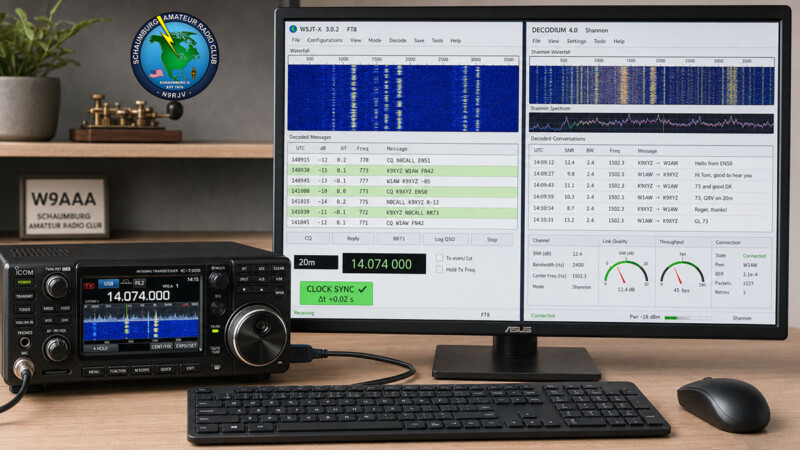
Here is a useful digital-mode experiment for SARC members. WSJT-X 3.0.2 and DECODIUM 4.0 “Shannon” can both place weak-signal activity on your screen, but they approach the operating experience differently.
WSJT-X remains the official reference program for FT8 and many related weak-signal modes. DECODIUM builds on that software lineage while adding FT2, a redesigned interface, integrated station tools, and a rapidly developing C++ architecture.
This is not a declaration that one program is always better. It is a practical comparison intended to help operators choose the right software for their interests and test both programs fairly.
Topic Snapshot
| Item | Details |
|---|---|
| Subject | A comparison of WSJT-X 3.0.2 and DECODIUM 4.0 “Shannon” |
| Post idea from | Paul Meyers — KE9EJX |
| Primary modes | FT8, FT4, FT2, Q65, WSPR, and other weak-signal digital modes |
| WSJT-X version reviewed | WSJT-X 3.0.2, the current General Availability release when this article was prepared[1] |
| DECODIUM release reviewed | DECODIUM 4.0 package version 1.0.508; this project changes frequently, so check the official release page before downloading[6] |
| Audience | SARC members, visitors, new hams, digital operators, and technical experimenters |
| Main question | Which program best matches the way you want to operate? |
| Call to action | Choose a digital mode, begin with receive-only testing, and then make a contact |
What Is WSJT-X 3.0.2?
WSJT-X is the official weak-signal communication program created and maintained by Joe Taylor, K1JT, and the WSJT Development Team. It supports eleven documented modes: FT8, FT4, Q65, JT65, JT9, JT4, FST4, FST4W, MSK144, WSPR, and Echo.[2]
Version 3.0 added parallel FT8 decoding, message filters, audible alerts, band hopping, improved high-resolution display support, and additional Earth-Moon-Earth operating features. Version 3.0.2 is primarily a bug-fix release. It includes corrections for Ham Radio Deluxe, OmniRig, Transceiver Control Interface, audio handling, installation, and several operating tools.[3]
WSJT-X also works with the QMAP and MAP65 companion programs. These tools are especially useful for wideband Q65 and JT65 reception, moonbounce, and other advanced VHF, UHF, and microwave work.
What Is DECODIUM 4.0 “Shannon”?
DECODIUM 4.0 Core Shannon is an independent weak-signal digital-mode application based on the WSJT-X and DECODIUM development lineage. Its name honors Claude Shannon and the role of information theory in reliable communication through noise.[4]
The program combines a Qt/QML interface with decoding and transmitting components that are being progressively migrated to C++. Its documentation lists FT8, FT4, FT2, Q65, MSK144, JT65, JT9, JT4, FST4, FST4W, and WSPR support. The availability of individual features can vary by operating system, decoder backend, and build.[4]
DECODIUM places many station tools inside one program. These include a live map, DX Cluster, PSK Reporter tools, an ADIF log, persistent decode history, internal Network Time Protocol synchronization, customizable panels, and a local-network web dashboard.[5]
The project is developing quickly. Its documentation notes that some native decoder, modulator, and cross-platform components remain under migration or consolidation. Operators should record the exact build number when reporting a problem or comparing results.
Side-by-Side Comparison
| Area | WSJT-X 3.0.2 | DECODIUM 4.0 “Shannon” |
|---|---|---|
| Project role | Official WSJT Development Team distribution and reference implementation | Independent project built from the WSJT-X and DECODIUM lineage |
| Release approach | General Availability release with point releases that usually concentrate on corrections | Fast-moving project with frequent feature, architecture, packaging, and interface updates |
| FT8 and FT4 | Core, well-documented operating modes | Supported with a redesigned interface and integrated operating tools |
| FT2 | Not included in the eleven modes listed by the official WSJT-X documentation | A central project feature with 3.75-second transmit-and-receive slots and asynchronous decoding |
| Q65 and EME | Strong emphasis on Q65, Echo, QMAP, MAP65, and Earth-Moon-Earth operation | Q65 is listed, although the project documentation emphasizes FT2, FT8, and integrated station operation |
| FT8 decoding | Version 3.0 provides optional parallel processing with concurrent threads | Uses the project’s Raptor decoding work and progressively migrated C++ paths |
| Main interface | Familiar two-pane operating window with a separate Wide Graph waterfall | Customizable Qt/QML workspace with dockable and detachable panels |
| Maps and cluster tools | Can exchange information with companion and third-party programs | Provides integrated Live Map, DX Cluster, and PSK Reporter panels |
| Decode history | Maintains operating and decode information in standard program files | Provides searchable, persistent SQLite decode history with ADIF export |
| Time synchronization | Requires the station computer to maintain an accurate system clock | Adds an internal NTP client and a panel for monitoring time offset and received DT values |
| Radio control | Supports established CAT control methods, including Hamlib, FLRig, HRD, OmniRig, and TCI-related workflows | Documents Hamlib, native radio backends, HRD, OmniRig, TCI, and local serial control |
| External integration | Provides UDP networking, logging, reporting, and cooperating-program support | Documents WSJT-X-compatible UDP, ADIF TCP, N1MM, PSK Reporter, QRZ Logbook, Cloudlog, and other connections |
| Remote operation | Normally handled through station-control or third-party software | Includes an optional local-network web dashboard for a computer, tablet, or phone |
| Best starting point | Operators who want the official release, established documentation, or advanced EME tools | Experimenters interested in FT2 or an integrated, customizable digital-station workspace |
The Important FT2 Difference
FT2, or Fast Track 2, is a digital mode created within the DECODIUM project. According to its documentation, FT2 uses 3.75-second transmit-and-receive slots. Each transmission lasts approximately 2.52 seconds.[5]
That short cycle can make contacts move much faster than FT8. It also leaves less time for the computer to receive, decode, select a response, and prepare the next transmission.
Clock accuracy, audio configuration, and processor performance therefore become especially important. The DECODIUM manual recommends beginning with FT8, confirming that the station decodes properly, and moving to FT2 only after the basic configuration is working.
FT2 activity may be less common than FT8 activity. Check current project documentation, working-frequency information, applicable FCC rules, and the appropriate amateur band plan before transmitting. Do not assume that an FT8 calling frequency is automatically the correct place for an FT2 experiment.[7][8]
Can One Program Decode More Signals?
That question cannot be answered fairly with one crowded-band screenshot.
The programs offer different decoder settings, filters, hints, timing controls, and display rules. A larger number on the screen does not necessarily mean more valid signals were recovered. Duplicate messages, hinted decodes, filtered messages, and false decodes can change the total.
WSJT-X 3.0 introduced parallel FT8 processing and other performance improvements. DECODIUM uses its Raptor decoding work, C++ components, OpenMP where available, and asynchronous processing for FT2. Those design differences are worth testing, but they do not establish a universal winner for every computer, band condition, and configuration.
A useful comparison should measure valid, unique messages recovered from the same recorded audio.
How to Run a Fair Comparison
1. Record the Test Conditions
Write down the computer, operating system, radio, audio interface, software version, mode, decode depth, and any special decoder options. A comparison without these details is difficult to repeat.
2. Back Up the Station
Back up the existing ADIF log and program settings before installing or changing software. Use the official download source for each program.
3. Begin in Receive-Only Mode
Disable transmitting while confirming the audio input, waterfall, frequency, mode, and clock. This prevents an unexpected transmission while CAT and audio controls are being tested.
4. Do Not Give Both Programs Control at Once
Close one program before allowing the other to control the radio, serial port, audio output, or push-to-talk function. Two programs trying to command the same radio can cause frequency, mode, or transmit-control conflicts.
5. Use the Same Audio
Record several reception periods and decode the same WAV files in both programs. Keep the passband, mode, and comparable decode options as close as possible.
6. Count Valid Unique Messages
Separate unique valid messages from duplicates and questionable decodes. Look for complete callsigns, plausible grids, consistent signal reports, and messages confirmed in later cycles.
7. Compare the Entire Operating Experience
Decoder count is only one measurement. Also compare decode delay, processor load, CAT reliability, logging, screen readability, and how easily you can complete a contact.
| Measurement | What to Record | Why It Matters |
|---|---|---|
| Valid unique decodes | Confirmed messages recovered from the same audio | Provides a more useful result than the total number of displayed lines |
| Questionable decodes | Incomplete, implausible, or unconfirmed callsigns and messages | Helps identify false or overly aggressive decoding |
| Decode latency | Time from the end of a received signal to its appearance | Especially important with short operating cycles |
| Processor load | Typical and peak CPU use during busy periods | Shows whether the computer can keep pace without stalling |
| Interface responsiveness | Waterfall, clicking, scrolling, and panel response | A slow interface can interfere with actual operation |
| CAT and PTT reliability | Frequency changes, mode changes, split behavior, and transmit control | Reliable station control is essential before transmitting |
| Logging and reporting | ADIF entries, PSK Reporter spots, and external logger transfers | Prevents lost or incomplete contact records |
| Operator preference | Readability, workflow, and ease of correcting a mistake | The best station software must also work well for its operator |
Which Program Should You Try First?
---
config:
  markdownAutoWrap: true
  flowchart:
    wrappingWidth: 220
    useMaxWidth: true
    nodeSpacing: 40
    rankSpacing: 50
---
flowchart TD
    A["`Choose your main
digital-mode goal`"]

    B{"`What interests
you most?`"}

    C["`Begin with
WSJT-X 3.0.2`"]

    D["`Evaluate
DECODIUM 4.0`"]

    E["`Run a controlled
receive test`"]

    A --> B

    B -->|"Official FT modes,<br/>Q65, or EME"| C
    B -->|"FT2 or an<br/>integrated dashboard"| D

    C --> E
    D --> E
A new digital operator will usually find WSJT-X the clearest reference point because its documentation, operating conventions, and support community are well established.
An operator who already understands FT8 may enjoy evaluating DECODIUM’s integrated tools and flexible workspace. DECODIUM is also the necessary choice for someone who specifically wants to explore FT2.
For advanced Q65, moonbounce, or wideband VHF and UHF work, the official WSJT-X, QMAP, and MAP65 combination deserves careful consideration.
There is no requirement to make a permanent choice. You can keep both programs available, provided that only one controls the radio and audio output at a time.
Suggested SARC Goals
| Member Type | Suggested Goal | First Step |
|---|---|---|
| New digital operator | Decode FT8 and complete one properly logged contact | Begin with the official WSJT-X tutorial or DECODIUM’s FT8 quick-start procedure |
| Returning operator | Review the newer filtering, alert, and sequencing tools | Install the current release and verify saved radio and audio settings |
| Technical experimenter | Compare both FT8 decoders with the same WAV recordings | Create a written test sheet before examining the results |
| FT2 experimenter | Receive and study FT2 before transmitting | Verify clock accuracy, CPU performance, software version, and current operating information |
| DX or contest operator | Evaluate filters, alerts, queues, and multi-station workflows | Test with saved audio before relying on a feature during a busy event |
| VHF or EME operator | Explore Q65, Echo, QMAP, and MAP65 | Read the official WSJT-X guide for the intended propagation path |
| SARC presenter | Prepare a repeatable live comparison for a club meeting | Bring the same recordings, settings, and measurement worksheet for both programs |
Give Digital Modes a Try
WSJT-X 3.0.2 is a strong starting point for operators who want the official weak-signal platform and its established operating tools. DECODIUM 4.0 “Shannon” offers an interesting alternative for operators who want FT2, a customizable workspace, and more station functions in one application.
Start with reception. Confirm the clock, radio control, audio levels, and waterfall. Then make a careful, low-power contact with a clean transmit signal and little or no automatic level control activity.
Most importantly, keep notes and share what you learn. A repeatable comparison from a SARC station is more useful than a claim based on one busy band opening.
Choose a digital mode, listen first, and see what your station can decode.
Begin with receive-only testing, and share your results with SARC
References
- “Get WSJT-X,” WSJT Development Team, official WSJT-X website. Accessed July 31, 2026. https://wsjtx.github.io/wsjtx/downloads.html
- “WSJT-X Official Home,” Joe Taylor, K1JT, and the WSJT Development Team. Accessed July 31, 2026. https://wsjtx.github.io/wsjtx/index.html
- “WSJT-X Release Notes, Release 3.0.2,” WSJT Development Team, June 2026. Accessed July 31, 2026. https://wsjtx.github.io/wsjtx/Release_Notes.txt
- “Decodium 4.0 Core Shannon,” IU8LMC and project contributors, GitHub repository and project documentation. Accessed July 31, 2026. https://github.com/iu8lmc/Decodium-4.0-Core-Shannon/
- “DECODIUM 4.0 Core Shannon User Manual,” DECODIUM project, FT2.it. Accessed July 31, 2026. https://www.ft2.it/manual/decodium4_manual_en.html
- “DECODIUM 4.0 Core Shannon Releases,” DECODIUM project contributors, GitHub. Accessed July 31, 2026. https://github.com/elisir80/Decodium-4.0-Core-Shannon/releases
- “47 CFR Part 97—Amateur Radio Service,” Electronic Code of Federal Regulations, Federal Communications Commission. Accessed July 31, 2026. https://www.ecfr.gov/current/title-47/chapter-I/subchapter-D/part-97
- “Band Plan,” American Radio Relay League. Accessed July 31, 2026. https://www.arrl.org/band-plan-1