New to digital? Start with Install & Setup FT8.
Find Your Place on the Air
Here is a practical operating guide for Schaumburg Amateur Radio Club (SARC) members and visitors. Amateur radio is not one operating experience. You can talk through a local repeater, send Morse code, make a computer-assisted contact, exchange an image, or communicate through a satellite.
This page introduces the main ham radio operating modes in plain language. It also explains how operating modes differ from systems, signal paths, and activities. Whether you are newly licensed, returning to the hobby, or looking for a fresh challenge, there is a comfortable place to begin.
Topic Snapshot
| Subject | Ham Radio Operating Modes |
|---|---|
| Page idea from | Paul Meyers — KE9EJX |
| Audience | SARC members, visitors, new hams, the public, and active operators |
| Main question | Which operating mode best matches what you want to do on the air? |
| Best first step | Choose one interest, listen first, and learn the normal operating procedure. |
| Call to action | Choose a mode, confirm your operating privileges, and get on the air with SARC. |
What Is a Ham Radio Operating Mode?
Radio amateurs often use the word mode in more than one way. It may mean a modulation method, such as amplitude modulation (AM) or frequency modulation (FM). It may also mean a broader operating method, such as voice, continuous wave (CW), or packet radio.1
In the United States, the Federal Communications Commission (FCC) uses defined emission categories that include CW, data, image, phone, radioteletype (RTTY), spread spectrum, and test emissions.2 The emissions you may transmit depend on the band, band segment, and privileges held by the station’s control operator.3
A simple way to understand the subject is to separate it into three layers:
| Layer | What It Describes | Examples |
|---|---|---|
| Communication family | The kind of information being exchanged | Voice, CW, data, and images |
| Specific mode or protocol | How the information is placed on the radio signal and interpreted | FM, single sideband (SSB), FT8, RTTY, and slow-scan television (SSTV) |
| System, path, or activity | Where the signal travels or why the contact is being made | Repeaters, satellites, Earth-Moon-Earth (EME), contesting, DXing, and public-service nets |
Therefore, FT8 is a specific digital mode, while a satellite is a communication path that may carry FM voice, SSB, CW, or digital data. Likewise, contesting and emergency communication are operating activities that can use several different modes.
Before transmitting, check both the current FCC rules and an appropriate band plan. An amateur band plan is a voluntary way to separate activities that may not work well beside one another, but it does not replace the rules.4
Explore Common Operating Modes
Voice: Talk With Other Operators
Voice operation, also called phone, is a natural starting point for many new hams. FM is widely used for local very-high-frequency (VHF) and ultra-high-frequency (UHF) simplex and repeater contacts. Meanwhile, SSB is a common choice for voice on the high-frequency (HF) bands. AM and several digital-voice systems add more choices.5
Start by listening to a local conversation or net. Notice how operators identify, pause between transmissions, and keep an exchange moving. Then write down a simple opening before you key the microphone.
CW: Communicate With Morse Code
CW is radiotelegraphy using International Morse code. The initials come from continuous wave, the radio-frequency signal that is switched on and off to form dots and dashes.6
You do not need to begin at high speed. First, learn a few characters accurately. Next, practice with a key, paddle, or code-practice oscillator. Finally, listen for slow, clearly sent exchanges and build speed gradually.
Digital Data: Let the Radio and Computer Work Together
Digital operation covers many different experiences. RTTY and PSK31 support typed exchanges. Packet radio sends information in groups of data. FT8, FT4, and related protocols use structured messages and software decoding. Each mode has its own purpose, timing, software, and operating customs.7
- Keyboard-to-keyboard modes support a typed conversation.
- Packet and reporting systems move short blocks of information between stations or nodes.
- Structured weak-signal modes exchange call signs, locations, reports, and acknowledgements in a compact format.
FT8 is designed for reliable contacts under weak-signal conditions. It uses brief, time-synchronized transmission periods and a structured exchange rather than an open-ended conversation.8 A good first goal is to receive and decode signals before enabling transmit.
Image Modes: Exchange Pictures and Video
Image operation adds a visual side to amateur radio. SSTV sends still pictures through a voice-bandwidth channel. Amateur television (ATV) sends moving video and normally requires a wider signal. Other image-related systems serve specialized purposes.9
Receiving an SSTV image can be a friendly first experiment. However, image modes differ greatly in bandwidth, equipment, and authorized operating segments. Check the rules and current band plan before transmitting.
Weak-Signal Operation: Recover Signals Near the Noise
Weak-signal operation is a specialty, not one modulation method. Operators may use CW, SSB, FT8, Q65, JT65, or another mode, depending on the band and propagation path. The WSJT-X suite includes protocols designed for reliable contacts under weak-signal conditions, including modes used for meteor scatter, tropospheric scatter, and EME work.8
EME, often called moonbounce, means sending a signal from Earth, reflecting it from the Moon, and receiving it back on Earth. Therefore, EME is the path. CW, SSB, Q65, and JT65 are examples of modes that may be used on that path.
Satellite and Space Operation: Use a Moving Radio Path
An amateur satellite may carry FM voice, SSB, CW, or digital communication. The operating window is limited to the satellite’s pass over your area, and the station may need to account for changing direction and Doppler shift. AMSAT’s beginner material covers tracking, antennas, radios, and operating techniques for FM, SSB, CW, and digital satellites.10
Because satellites, frequencies, and operating status can change, check current official information before every session. A receive-only pass is a practical way to begin.
Operating Activities: Give the Mode a Purpose
Many popular parts of ham radio are activities rather than separate signal modes. Contesting, DXing, portable operation, Parks on the Air, public-service nets, emergency communication, and special-event stations can use voice, CW, data, or image modes.
That is good news for a new operator. You can first choose what you want to accomplish. Then you can choose a mode that fits the activity, your privileges, your station, and current conditions.
Compare the Main Choices
| Mode or Activity | What You Exchange | Common Examples | A Practical First Step |
|---|---|---|---|
| Voice | Spoken conversation | FM, SSB, AM, and digital voice | Listen to a local net or a clear simplex frequency. |
| CW | Morse code | Hand-keyed or electronically keyed CW | Practice a small group of characters and copy a slow signal. |
| Conversational digital | Typed text | RTTY, PSK31, and similar sound-card modes | Install suitable software and decode before transmitting. |
| Structured weak-signal digital | Short, defined contact information | FT8, FT4, Q65, and JT65 | Confirm computer time, audio input, and receive decoding. |
| Image | Still pictures or moving video | SSTV and ATV | Receive and save one correctly decoded image. |
| Satellite | Voice, CW, or data through a spacecraft | FM satellites, linear transponders, and digital satellites | Track and receive one current pass. |
| EME | Weak signals reflected from the Moon | CW, SSB, Q65, and JT65 | Study a proven station and begin by monitoring. |
Which Operating Mode Should You Try First?
There is no single best mode. Instead, begin with the kind of experience you want. The following path offers a simple starting point.
---
config:
  theme: base
  themeVariables:
    primaryTextColor: "#000000"
    secondaryTextColor: "#000000"
    tertiaryTextColor: "#000000"
    lineColor: "#000000"
  markdownAutoWrap: true
  flowchart:
    wrappingWidth: 220
    useMaxWidth: true
    nodeSpacing: 40
    rankSpacing: 50
---
flowchart TD
    accTitle: Choosing a ham radio operating mode
    accDescr: The operator chooses an interest, checks privileges and equipment, listens, and then makes a contact.

    A["Choose what you want to do"]
    B{"What interests you most?"}
    C["Try voice"]
    D["Try CW"]
    E["Try a digital mode"]
    F["Try an image mode"]
    G["Try satellite reception"]
    H["Check privileges, equipment, and the band plan"]
    I["Listen and learn the procedure"]
    J["Make and log a contact"]

    A --> B
    B -->|"Conversation"| C
    B -->|"Morse code"| D
    B -->|"Computer-assisted contacts"| E
    B -->|"Pictures"| F
    B -->|"Space communication"| G
    C --> H
    D --> H
    E --> H
    F --> H
    G --> H
    H --> I
I --> JHow to Participate
1. Choose One Clear Goal
Make the first goal small and observable. For example, listen to a net, copy one CW exchange, decode several FT8 signals, receive one SSTV image, or monitor one satellite pass.
2. Confirm Your Privileges and Operating Segment
Check your license-class privileges, the authorized emission type, and the current band plan before transmitting. Do not rely on an old frequency list or a software default. Rules, recommendations, and coordinated activity can change.3
3. Prepare the Correct Station Path
Voice may need a microphone and the correct radio mode. CW may need a key or paddle. Computer-assisted modes may need radio control, an audio interface, suitable software, and accurate time. Satellite work may add tracking information and an antenna you can aim.
Use the operating manual for your exact transceiver. Menu names, audio sources, filters, and connection methods vary between models.
4. Listen and Test Before Transmitting
Listening teaches the pace, exchange, and normal frequency use. For a computer-assisted mode, confirm the receive path first. For voice or CW, monitor your signal safely when suitable test equipment or an experienced operator is available.
5. Use a Clean Signal and Good Operating Practice
The FCC requires an amateur transmission to use no more bandwidth than necessary for its information rate and emission type. It also requires modulation products to remain within the band or segment available to the control operator.11 Therefore, use appropriate audio drive, power, filters, and operating settings for the selected mode.
6. Make, Log, and Review the Contact
After the contact, record the call sign, date, time, band, and mode. Then note what worked and what should change. A short station note can make the next session easier and gives you something useful to share with another SARC member.
What to Bring to a SARC Operating-Mode Session
- Your exact radio model and its current operating manual.
- A short description of the mode or activity you want to try.
- The microphone, key, paddle, computer, interface, or cables needed for that mode.
- A current license-privilege chart and appropriate band-plan information.
- Your call sign and grid locator if the planned activity uses them.
- A notebook or saved station checklist.
- Questions for a SARC operator who already uses the mode.
If bringing a complete station is not practical, bring photographs of the connections and screenshots of the current radio or software settings. Those details can make troubleshooting much faster.
Related SARC Digital-Mode Guides
Ready to build a digital station? Use Install & Setup FT8 for a receive-first checklist that covers radio control, audio, timing, safe transmit testing, and a first contact.12
After the station is working, read Digital-Mode WSJT-X 3.0 vs. DECODIUM 4.0 “Shannon” to compare two software approaches and plan a fair receive test.13
Suggested SARC Starting Goals
| Member Type | Suggested Goal | First Step |
|---|---|---|
| Visitor or radio-curious guest | Hear or see two different operating modes. | Ask a SARC member to demonstrate a voice contact and one other mode. |
| Newly licensed ham | Complete one comfortable, supervised contact. | Choose voice, CW, or digital operation and review your privileges. |
| Returning operator | Restore one familiar mode to dependable operation. | Review the current manual, connections, and band information. |
| Digital-mode beginner | Decode signals before enabling transmit. | Verify the radio mode, audio input, software, and computer time. |
| CW learner | Copy a short, slow exchange accurately. | Practice a small character group and listen regularly. |
| Satellite beginner | Receive and record one current satellite pass. | Confirm the satellite’s status, pass time, and downlink information. |
| Experienced operator | Help another member try a mode safely. | Prepare a short demonstration and a model-specific checklist. |
Give an Operating Mode a Try
You do not have to master every part of amateur radio. Instead, choose one mode that matches your interest. Listen first. Confirm your privileges. Learn the basic exchange. Then make one careful contact and build from there.
SARC members bring different stations, skills, and operating interests to the club. That variety is an advantage. Ask questions, compare notes, and share what you learn.
Choose one operating mode, set one practical goal, and get on the air with SARC.
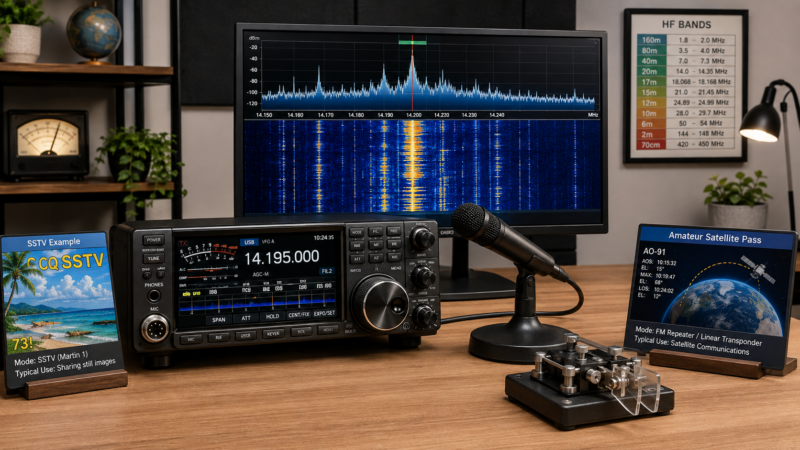
Amateur radio station prepared for voice, Morse code, digital, image, and satellite operating modes.
- Modes & Systems. ARRL: The National Association for Amateur Radio. ↩
- 47 CFR § 97.3 — Definitions. Electronic Code of Federal Regulations, Office of the Federal Register and Federal Communications Commission. ↩
- 47 CFR § 97.305 — Authorized Emission Types. Electronic Code of Federal Regulations, Office of the Federal Register and Federal Communications Commission. ↩ ↩
- Band Plan. ARRL: The National Association for Amateur Radio. ↩
- Voice Modes. ARRL: The National Association for Amateur Radio. ↩
- CW Mode. ARRL: The National Association for Amateur Radio. ↩
- Digital Data Modes. ARRL: The National Association for Amateur Radio. ↩
- WSJT-X User Guide. WSJT Development Group. ↩ ↩
- Image Modes. ARRL: The National Association for Amateur Radio. ↩
- Getting Started with Amateur Satellites — Hard Copy. Radio Amateur Satellite Corporation (AMSAT). ↩
- 47 CFR § 97.307 — Emission Standards. Electronic Code of Federal Regulations, Office of the Federal Register and Federal Communications Commission. ↩
- Install & Setup FT8. Schaumburg Amateur Radio Club, N9RJV. ↩
- Digital-Mode WSJT-X 3.0 vs. DECODIUM 4.0 “Shannon”. Schaumburg Amateur Radio Club, N9RJV. ↩