Taking the ESP32 Lightning Detector to the Next Level
Adding Home Assistant and Alexa announcements
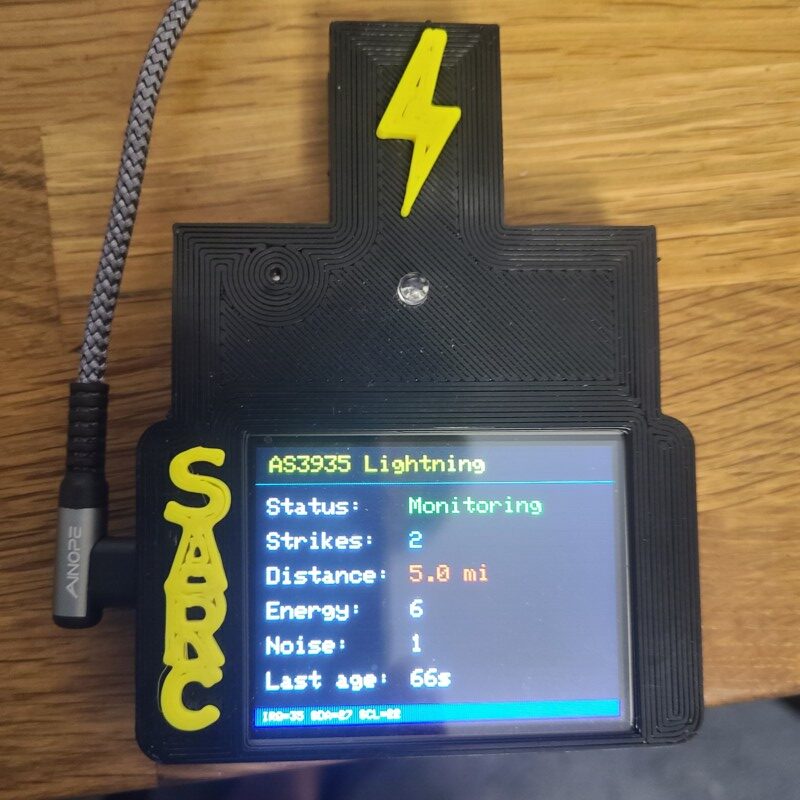
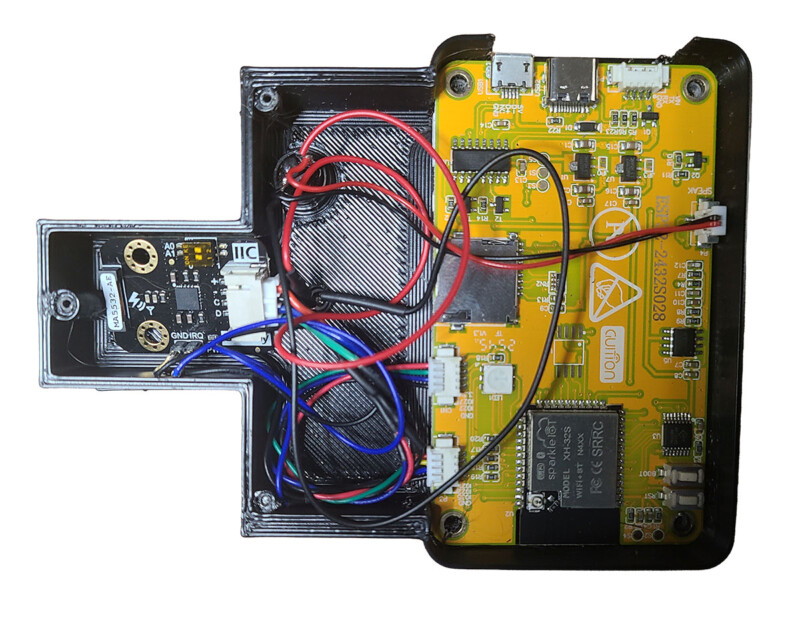
Here is a useful next step for SARC builders. The ESP32 and AS3935 lightning detector can already monitor nearby lightning activity, sound a buzzer, and show information on its local display. The updated project adds a brief Wi-Fi connection, MQTT messaging, Home Assistant, and an optional announcement on selected Amazon Alexa devices.1
This is a good example of what amateur radio encourages: build something, test it, study its limits, and then connect it to a larger system.
Post idea and project material from Kent Ochs, W9KAO.
Topic Snapshot
| Item | Details |
|---|---|
| Subject | Taking the ESP32 Lightning Detector to the Next Level |
| Post Written by | Kent Ochs, W9KAO |
| Core project | ESP32 display board, AS3935 lightning sensor, local display, and buzzer |
| Network path | ESP32 to MQTT broker to Home Assistant to an optional Alexa announcement |
| Audience | SARC members, visitors, new hams, the public, operators, and volunteers |
| Purpose | Add a useful home-automation alert while preserving stand-alone monitoring |
| Call to action | Join SARC |
What the Detector Really Measures
The AS3935 is a lightning-sensor integrated circuit. It can recognize lightning activity and report an estimated distance to the leading edge of a storm. Its published range extends from overhead to about 40 kilometers in coarse steps. It does not identify the exact location or distance of an individual bolt.2
That distinction matters. A screen reading such as “5.0 mi” is a useful project estimate, not a surveyed strike location. The displayed energy number is also a relative sensor value, not joules or a calibrated measurement of lightning strength.
Sensor settings and placement matter. The attached sketch selects the outdoor profile. Builders should confirm that the indoor or outdoor profile matches the actual installation and should expect to adjust noise, watchdog, and spike-rejection settings for the local electrical environment.2
How the Updated Sketch Works
MQTT is a lightweight publish-and-subscribe messaging protocol. A device publishes a message to a named topic, and another system subscribes to that topic.3 In this project, the ESP32 is the publisher, an MQTT broker carries the message, and Home Assistant receives it.
---
config:
  markdownAutoWrap: true
  flowchart:
    wrappingWidth: 220
    useMaxWidth: true
    nodeSpacing: 40
    rankSpacing: 50
---
flowchart TD
    A["`AS3935 detects
a valid event`"]

    B["`ESP32 updates the
display and buzzer`"]

    C{"`Is this the first valid strike
in the current session?`"}

    D["`Send a brief Wi-Fi
and MQTT transmission`"]

    E["`Update the local display
and strike count only`"]

    F["`Home Assistant automation
returns an acknowledgement`"]

    G["`The automation may alert
selected Alexa devices`"]

    A --> B
    B --> C

    C -->|"Yes"| D
    C -->|"No"| E

    D --> F
    F --> G
- Normal monitoring: The display stays on, the AS3935 remains armed, and Wi-Fi stays off. This is a deliberate attempt to reduce radio-frequency noise near the lightning sensor.
- Local response: A valid event increases the session count, updates the display, and sounds the buzzer.
- First-strike network burst: For the first valid strike in a session, the sketch temporarily disables the sensor interrupt, turns on Wi-Fi, connects to MQTT, and sends one event.
- Acknowledgement and retry: Home Assistant must echo the event’s acknowledgement ID to the detector. If that reply is not received, the sketch can make up to three publish attempts in total during the same connection window.
- Return to monitoring: The ESP32 turns Wi-Fi off, waits for the hardware to settle, clears pending sensor state, and resumes local monitoring.
- Session reset: Later strikes update the local display but do not create another network alert. After 30 minutes without another valid strike, the next strike can start a new session and send a new alert.4
If Wi-Fi, the broker, or Home Assistant is unavailable, the detector resumes its local display and buzzer functions after the network attempt ends. During the Wi-Fi and MQTT window, however, the sensor interrupt is detached. A lightning event during that interval may be missed or cleared. A failed first alert also does not cause later strikes in the same session to reconnect, so this version should not be described as continuous monitoring or a complete network log of every strike.
What the MQTT Event Contains
The supplied sketch sends an event type, an acknowledgement ID, estimated distance in kilometers and miles, a relative energy value, and the current session strike count. It also publishes retained MQTT discovery information so Home Assistant can create the event entity with little manual entity configuration.5
An MQTT Event entity fits this use because an event is momentary rather than continuously on or off. Home Assistant can also make the other JSON fields available as event attributes for an automation.6
Adding Home Assistant and Alexa Announcements
The ESP32 does not communicate directly with Alexa. Home Assistant receives the MQTT event and runs a separate automation. If a compatible Alexa integration is configured, that automation can send a Speak or Announce notification to supported Echo devices.7
A simple announcement might say:
“Lightning detected 18 miles away.”
A closer estimate might use stronger wording:
“Warning. Lightning detected 6 miles away.”
Those distances are examples, not tested safety thresholds. Choose any automation rules carefully. You can target selected Echo devices, add a cooldown, and ignore a repeated event with the same acknowledgement ID. That last step helps prevent duplicate announcements if Home Assistant receives an event but its acknowledgement reaches the ESP32 too late.
Home Assistant and Alexa features can change. Check the current official integration instructions before building the automation.
What You Need
- The completed ESP32 and AS3935 detector
- A USB data cable and a computer running the Arduino IDE
- The current ESP32 board support package, Arduino_GFX display library, DFRobot_AS3935 library, and a compatible MQTT client library
- A working Home Assistant installation –Get Lightning Detector Code
- An MQTT broker with a dedicated account for the detector
- A compatible Alexa integration if voice announcements are wanted
- Time to test the local detector, MQTT event, acknowledgement, and announcement separately
A Practical Setup Path
- Make a clean working copy. Keep the original sketch unchanged so you can return to a known starting point.
- Sanitize the configuration. Replace network names, passwords, broker addresses, and account information. Never publish a copy containing real credentials.
- Install current board and library support. Select the correct ESP32 board and serial port before compiling and uploading.8
- Review the MQTT library. The supplied sketch uses PubSubClient. Its maintainer now labels it unmaintained and recommends an actively maintained alternative for new projects. Test compatibility before choosing a long-term client.9
- Give each detector a unique identity. If more than one unit is used, assign unique MQTT client IDs, discovery IDs, and topics.
- Configure Home Assistant. Confirm that MQTT discovery creates the event entity. Then build the acknowledgement automation before adding the Alexa action. The supplied sketch cannot confirm delivery until a separate Home Assistant automation echoes the received acknowledgement ID.
- Test in layers. Verify the local display and buzzer first. Next, watch the MQTT topic. Then confirm the Home Assistant event and acknowledgement. Add the voice announcement last.
- Correct the out-of-range display. The current sketch converts the AS3935
0x3Fout-of-range value to 63 kilometers, or about 39.1 miles. Correct that case to show “out of range” before relying on the distance display. Confirm that relative energy and session count are labeled clearly.2 - Test around local noise sources. Displays, switching power supplies, computers, and transmitters may affect a sensitive lightning detector. Keep notes and change one setting at a time.2
Protect the Network
The development sketch embeds site-specific credentials in the source and compiled firmware. It also uses WiFiClient with unencrypted MQTT on port 1883. Remove all real credentials before sharing the file, and rotate any credentials that have already been exposed. Use a dedicated broker account and access-control rules that limit the topics the detector can publish or subscribe to. Do not expose this unencrypted broker connection directly to the internet. Mosquitto’s current documentation covers authentication and topic access control.10
Current Behavior and Future Ideas
| Area | Current Sketch | Possible Next Step |
|---|---|---|
| Local monitoring | Display, buzzer, estimated distance, relative energy, and session count | Improve labels, add calibration notes, or add a settings screen |
| Network alerts | One first-strike MQTT event after a quiet period | Add carefully throttled updates or a separate logging mode |
| Home Assistant | MQTT discovery, event data, and custom acknowledgement | Add a dashboard, phone notification, or storm-session history |
| Alexa | Handled by a separate Home Assistant automation | Use selected speakers, distance wording, and duplicate suppression |
| Reliability | Local operation resumes after a network attempt; monitoring pauses during the Wi-Fi burst | Add health reporting, persistent logging, and clearer fault recovery |
Suggested SARC Goals
| Participant | Suggested Goal |
|---|---|
| Visitor or member of the public | Follow the path from a physical sensor to a useful home announcement. |
| New ham or new builder | Upload the sketch and confirm that local detection still works before adding networking. |
| Home Assistant user | Create the MQTT event, acknowledgement, and one carefully controlled announcement. |
| Experienced operator | Evaluate radio-frequency interference, placement, grounding, and power-supply noise. |
| Project volunteer or mentor | Help another builder test one layer at a time and document the results. |
Lightning Safety Comes First
This is an educational hobby project. It is not a certified weather-warning or life-safety system, and the sensor manufacturer does not guarantee exact strike locations or complete accuracy. Use official forecasts and alerts, and follow standard lightning-safety guidance.1112
The National Weather Service says there is no safe place outside when thunderstorms are nearby. If you hear thunder, move into a safe building or vehicle. Do not wait for this detector, an Alexa announcement, or any other hobby device to tell you to seek shelter.12
Give It a Try
This project brings together sensing, microcontrollers, software, networking, automation, and careful testing. That makes it a good SARC project for both newer builders and experienced troubleshooters.
Start with the local detector. Add MQTT. Confirm the Home Assistant event and acknowledgement. Add one useful announcement. Most importantly, keep notes about what worked and share what you learned with the club.
If hands-on projects like this sound interesting, come meet the club and learn with local operators and builders.13
Get Lightning Detector Code
Learn STM32 Microcontroller Programming
Join SARC
References
-
- “Taking the ESP32 Lightning Detector to the Next Level: Adding Home Assistant and Alexa Announcements” and
LightningDetectorHomeAutomation.ino. Project note and Arduino sketch supplied by Kent Ochs, W9KAO. Accessed July 29, 2026. No public URL was supplied. ↩ - “AS3935 Franklin Lightning Sensor IC Datasheet,” version 1-04. ScioSense. January 13, 2016. Accessed July 29, 2026. Full URL: https://www.sciosense.com/wp-content/uploads/2024/01/AS3935-Datasheet.pdf. Return to citation: a, b, c, d.
- “MQTT: The Standard for IoT Messaging.” MQTT.org. Accessed July 29, 2026. Full URL: https://mqtt.org/. ↩
LightningDetectorHomeAutomation.ino. Arduino sketch supplied by Kent Ochs, W9KAO. Accessed July 29, 2026. No public URL was supplied. ↩- “MQTT.” Home Assistant, Open Home Foundation. Accessed July 29, 2026. Full URL: https://www.home-assistant.io/integrations/mqtt/. ↩
- “MQTT Event.” Home Assistant, Open Home Foundation. Accessed July 29, 2026. Full URL: https://www.home-assistant.io/integrations/event.mqtt/. ↩
- “Alexa Devices.” Home Assistant, Open Home Foundation. Accessed July 29, 2026. Full URL: https://www.home-assistant.io/integrations/alexa_devices/. ↩
- “Installing Arduino-ESP32.” Espressif Systems; “DFRobot_AS3935 Arduino Library.” DFRobot, GitHub; and “Arduino_GFX.” Moon On Our Nation, GitHub. Accessed July 29, 2026. Full URLs: https://docs.espressif.com/projects/arduino-esp32/en/latest/installing.html; https://github.com/DFRobot/DFRobot_AS3935; https://github.com/moononournation/Arduino_GFX. ↩
- “Arduino Client for MQTT: PubSubClient.” Nick O’Leary, GitHub. Accessed July 29, 2026. Full URL: https://github.com/knolleary/pubsubclient. ↩
- “Authentication Methods” and “mosquitto.conf Manual Page.” Eclipse Mosquitto. Accessed July 29, 2026. Full URLs: https://mosquitto.org/documentation/authentication-methods/; https://mosquitto.org/man/mosquitto-conf-5.html. ↩
- “AS3935 Demo Kit User’s Guide,” version 1-03. ScioSense/ams. July 8, 2014. Accessed July 29, 2026. Full URL: https://www.sciosense.com/wp-content/uploads/2023/12/AS3935-Demo-Kit-User_s-Guide.pdf. ↩
- “When a Safe Building or Vehicle Is Nearby.” National Weather Service, National Oceanic and Atmospheric Administration. Accessed July 29, 2026. Full URL: https://www.weather.gov/safety/lightning-outdoors. Return to citation: a, b.
- ““Membership.” Schaumburg Amateur Radio Club. Accessed July 29, 2026. Full URL: https://www.n9rj.org/info/membership/. ↩
- “Taking the ESP32 Lightning Detector to the Next Level: Adding Home Assistant and Alexa Announcements” and