Radio Hill Gazette

The Physics Behind Amateur Radio

Understanding Electromagnetic Waves

Here is a useful physics idea for Schaumburg Amateur Radio Club (SARC) members: every on-air contact begins with an electromagnetic wave. Voice, continuous wave (CW) Morse code, and digital signals all depend on radio-frequency (RF) energy traveling from a transmitting antenna to a receiving antenna. Understanding that path makes frequency, wavelength, polarization, antennas, and propagation easier to connect.[1][5]

Topic Snapshot

Overview of this Learn Physics topic
Item Details
Subject Learn Physics: Understanding Electromagnetic Waves
Post idea from Paul Meyers – KE9EJX
Audience Members, visitors, new hams, the public, and operators
Why it matters Electromagnetic-wave physics connects transmitters, antennas, propagation, receivers, and operating practice.
Starting resource Physics with Elliot
Advanced resource Richard Behiel on YouTube
Call to action Learn Physics

What Is an Electromagnetic Wave?

An electromagnetic wave is a traveling pattern of changing electric and magnetic fields. These coupled fields can carry energy through air, other materials, and even the vacuum of space. Unlike a sound wave, an electromagnetic wave does not require air or another material medium.[2][3]

James Clerk Maxwell brought the laws of electricity and magnetism together in four relationships now called Maxwell’s equations. The equations predicted electromagnetic waves traveling at the speed of light in free space. Heinrich Hertz later generated and detected radio waves in laboratory experiments, confirming their wave behavior.[2]

Radio waves are one part of the electromagnetic spectrum. Infrared, visible light, ultraviolet, X-rays, and gamma rays are also electromagnetic waves. They share the same basic physics but have different frequencies, wavelengths, and photon energies.[1]

Electric Field, Magnetic Field, and Direction

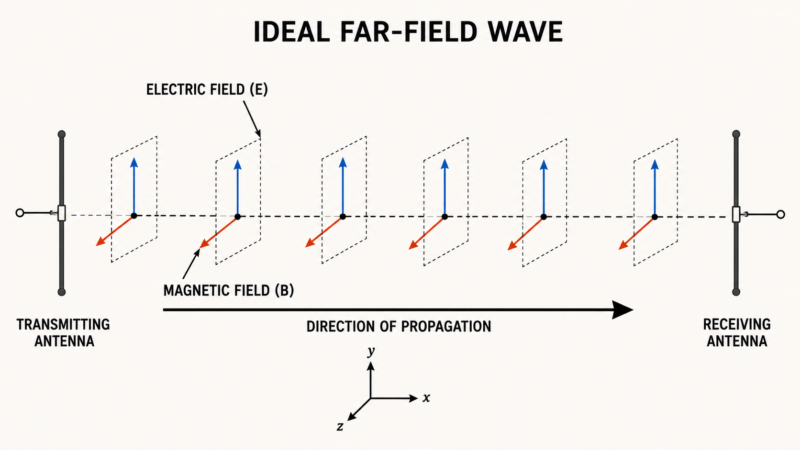
For an ideal plane wave, the electric field and magnetic field are at right angles to each other. Both are also at right angles to the direction in which the wave travels. That makes an electromagnetic wave a transverse wave. The fields rise and fall together as the wave moves forward.[3]

The three directions in an ideal electromagnetic plane wave
Part Direction Why radio operators care
Electric field Across one transverse direction Its orientation defines the wave’s polarization.
Magnetic field Perpendicular to the electric field It is the second coupled field in the wave.
Wave travel Perpendicular to both fields It shows the direction in which energy is moving.

This clean picture describes an ideal wave and is a useful far-field model. Close to an antenna, the fields are more complicated. Also, a sine-wave drawing shows how field strength and direction vary. It does not mean the radio signal follows a snake-shaped path through the air.

How an Antenna Starts the Wave

Electric charges radiate electromagnetic energy when they accelerate. In a transmitting antenna, radio-frequency alternating current repeatedly accelerates charges in the conductor. The antenna then launches energy into the surrounding space. At the other end of the path, an incoming field produces a small alternating electrical signal in the receiving antenna. The receiver selects the desired signal and recovers its information.[4][5]

Here is the simplified signal path:

---
config:
  markdownAutoWrap: true
  flowchart:
    wrappingWidth: 220
    useMaxWidth: true
    nodeSpacing: 40
    rankSpacing: 50
---
flowchart TD
    A["`The transmitter creates
a radio-frequency signal`"]

    B["`Alternating current accelerates
charges in the antenna`"]

    C["`Changing electric and magnetic
fields travel outward`"]

    D["`The electromagnetic wave
travels through space`"]

    E["`The field produces a small signal
in the receiving antenna`"]

    F["`The receiver selects and
demodulates the signal`"]

    G["`The operator hears audio
or receives data`"]

    A --> B
    B --> C
    C --> D
    D --> E
    E --> F
    F --> G

This flow is intentionally simple. A real station also includes feed lines, matching, losses, noise, modulation, and the effects of the path between stations.

Frequency, Wavelength, Speed, and Polarization

These terms describe different properties of the same wave. Learning them together is more useful than memorizing them separately.

Basic electromagnetic-wave terms
Term Plain-language meaning Amateur-radio connection
Frequency The number of cycles that pass a point each second, measured in hertz (Hz) A radio is tuned to frequency. One megahertz (MHz) is one million cycles per second.
Wavelength The distance over which one complete wave pattern repeats Many amateur bands are named for an approximate wavelength, such as 40 meters or 2 meters.
Amplitude The size or strength of an oscillating field Amplitude is one characteristic that can be varied to carry information.
Phase A wave’s position within its cycle compared with a reference Phase relationships affect interference, antenna arrays, and many digital modes.
Polarization The orientation of the electric field Common examples include horizontal, vertical, and circular polarization.

NASA uses these same ideas to describe electromagnetic energy. The Federal Communications Commission (FCC) also describes modulation as varying a carrier waveform’s amplitude, frequency, or phase to transmit information.[1][8]

The Wavelength Formula

In a vacuum, electromagnetic waves travel at exactly 299,792,458 meters per second. This is the speed of light, represented by c.[6]

Wavelength equals wave speed divided by frequency:

λ = c ÷ f

Here, λ is wavelength and f is frequency. For quick amateur-radio estimates in free space, use:

Wavelength in meters ≈ 300 ÷ frequency in MHz

Therefore, when frequency goes up, wavelength gets shorter. When frequency goes down, wavelength gets longer. The free-space formula is a starting point for antenna calculations. Practical antenna dimensions must also account for the actual design and installation.[3][17]

Frequency and Wavelength at a Glance

Representative amateur frequencies and approximate free-space wavelengths
Approximate band name Representative frequency Approximate free-space wavelength
80 meters 3.75 MHz 80.0 meters
40 meters 7.10 MHz 42.3 meters
20 meters 14.20 MHz 21.1 meters
15 meters 21.20 MHz 14.2 meters
10 meters 28.40 MHz 10.6 meters
2 meters 146 MHz 2.05 meters
70 centimeters 440 MHz 0.682 meter
---
config:
  theme: base
  themeVariables:
    xyChart:
      titleColor: "#000000"
      dataLabelColor: "#000000"
      xAxisLabelColor: "#000000"
      xAxisTitleColor: "#000000"
      xAxisTickColor: "#000000"
      xAxisLineColor: "#000000"
      yAxisLabelColor: "#000000"
      yAxisTitleColor: "#000000"
      yAxisTickColor: "#000000"
      yAxisLineColor: "#000000"
  xyChart:
    width: 900
    height: 540
    useMaxWidth: true
    chartOrientation: vertical
    titleFontSize: 18
    titlePadding: 18
    showDataLabel: true
    showDataLabelOutsideBar: true
    plotReservedSpacePercent: 62
    xAxis:
      labelFontSize: 13
      labelPadding: 8
      labelRotation: 0
      titleFontSize: 16
      titlePadding: 8
    yAxis:
      labelFontSize: 13
      labelPadding: 8
      titleFontSize: 15
      titlePadding: 8
---
xychart-beta
    title "Higher Frequency Means Shorter Wavelength in Free Space"
    x-axis "Frequency" ["3.75 MHz", "7.10 MHz", "14.20 MHz", "21.20 MHz", "28.40 MHz"]
    y-axis "Approximate Wavelength in Meters" 0 --> 90
    bar [80.0, 42.3, 21.1, 14.2, 10.6]

The table and graph use the free-space shortcut. Band names are approximate, and wavelength changes across a band. These numbers are not finished antenna lengths. A physical antenna is designed for a chosen fraction or multiple of wavelength and must be adjusted for its actual construction and installation.[6][10][17]

How Electromagnetic Waves Behave

A radio wave does not always travel by one clear, direct path. Depending on frequency and surroundings, electromagnetic waves may be reflected, refracted, diffracted, scattered, transmitted, or absorbed. Buildings, terrain, the ground, the atmosphere, and the ionosphere can all affect the signal that reaches a receiver.[7]

For example, high frequency (HF) signals can sometimes be bent through the ionosphere and returned toward Earth. This supports contacts beyond the horizon. Very high frequency (VHF) and ultra high frequency (UHF) operation is often closer to line of sight, although special propagation modes can extend the range. Conditions change, so operators learn to observe the band rather than expect the same result every day.[9][10][19]

Why This Matters in Amateur Radio

A working understanding of electromagnetic waves helps an operator connect several practical ideas:

  • Antenna dimensions: Wavelength provides a starting point for quarter-wave, half-wave, and other antenna designs.[17]
  • Polarization: The orientation of the electric field helps explain why antenna alignment can affect received signal strength.
  • Propagation: Frequency and wavelength influence how signals interact with terrain, buildings, the atmosphere, and the ionosphere.
  • Modulation: Information can be carried by controlled changes to a radio wave’s amplitude, frequency, or phase.
  • License study: The current Technician syllabus includes electromagnetic-wave properties, frequency and wavelength, polarization, and propagation. Candidates should check the official question pool for updates.[10][20]

Physics will not choose every station setting for you. However, it gives you a reliable framework for asking better questions and understanding what you observe on the air.

How to Participate: Learn and Apply the Physics

Start with Physics with Elliot

Physics with Elliot offers a visual route into physics. A useful lesson for this topic is There’s so much more to electric fields than you were taught. It moves from the electric field of a stationary charge toward moving charges, accelerated charges, and electromagnetic radiation.[11]

For a shorter visual, try Discovering the simplest electromagnetic wave! The site also has an Electric Field Lines interactive animation. The animation focuses on static electric fields rather than radio propagation, but it can help build intuition about what a field represents.[12][13]

Physics with Elliot is a general physics resource. Use amateur-radio references for antenna construction, station safety, operating rules, and band privileges. Video catalogs and course offerings may change, so check the official site for current material.

Try a Simple Station Exercise

What to bring: A calculator, one frequency of interest, basic information about the antenna, and a current band chart. A radio is optional because the calculation can be done from any example frequency.

  1. Choose a frequency you use or monitor.
  2. Divide 300 by the frequency in MHz to estimate the free-space wavelength in meters.
  3. Compare your answer with the band’s familiar name.
  4. For a simple linearly polarized antenna, estimate polarization from the orientation of its radiating element.
  5. Trace the path from transmitter to feed line, antenna, space, receiving antenna, and receiver.
  6. List anything along the path that might reflect, absorb, bend, or scatter the signal.

For example, 300 divided by 146 MHz is about 2.05 meters. That helps explain the name “2-meter band.” A free-space half wavelength would be about 1.03 meters, but a practical half-wave antenna may have a different finished length.[17]

Take an Optional Deeper Dive with Richard Behiel

Readers who enjoy mathematical physics can visit the Richard Behiel YouTube channel. His long-form video Electromagnetism as a Gauge Theory develops electromagnetism through symmetry, fields, and Maxwell’s equations.[14][15]

This is an advanced lesson, not a beginner amateur-radio tutorial. Start with frequency, wavelength, fields, and polarization. Then use Richard Behiel’s presentation when you are ready for the deeper mathematics.

Check Current Operating Information

Physics relationships are stable, but frequency allocations, license privileges, and operating rules can change. Before transmitting, check current Federal Communications Commission information and an up-to-date amateur band chart.[16][18]

Suggested SARC Goals

Ways to turn the physics into a practical club goal
Member type Suggested goal
Visitor or member of the public Explain in plain language that radio waves are one part of the electromagnetic spectrum.
New ham Choose one operating frequency and calculate its approximate free-space wavelength.
Active operator Trace the path from transmitter to antenna to receiver, then identify the polarization used by the station.
Antenna builder Compare free-space wavelength with the dimensions of one antenna design and note why practical dimensions differ.
Mentor or volunteer Use the signal-path diagram to explain electromagnetic waves to someone new to amateur radio.

Give It a Try

You do not need to solve all of Maxwell’s equations before the physics becomes useful. Start with one frequency, calculate its wavelength, look at the antenna, and trace the signal path. Then share what you found with another SARC member or visitor.

Learn Physics with Physics with Elliot

References

  1. Anatomy of an Electromagnetic Wave. NASA Science, Science Mission Directorate, National Aeronautics and Space Administration. Updated August 3, 2023. Accessed August 12, 2026. https://science.nasa.gov/ems/02_anatomy/
  2. Samuel J. Ling, William Moebs, and Jeff Sanny. 16.1 Maxwell’s Equations and Electromagnetic Waves. University Physics Volume 2, OpenStax, Rice University. Published October 6, 2016. Accessed August 12, 2026. https://openstax.org/books/university-physics-volume-2/pages/16-1-maxwells-equations-and-electromagnetic-waves
  3. Samuel J. Ling, William Moebs, and Jeff Sanny. 16.2 Plane Electromagnetic Waves. University Physics Volume 2, OpenStax, Rice University. Published October 6, 2016. Accessed August 12, 2026. https://openstax.org/books/university-physics-volume-2/pages/16-2-plane-electromagnetic-waves
  4. Paul Peter Urone and Roger Hinrichs. 24.2 Production of Electromagnetic Waves. College Physics 2e, OpenStax, Rice University. Published July 13, 2022. Accessed August 12, 2026. https://openstax.org/books/college-physics-2e/pages/24-2-production-of-electromagnetic-waves
  5. Jermaine Walker. Radio vs Optical Spectrum. National Aeronautics and Space Administration. Published September 27, 2023; updated February 14, 2024. Accessed August 12, 2026. https://www.nasa.gov/directorates/somd/space-communications-navigation-program/radio-vs-optical-spectrum/
  6. CODATA Value: Speed of Light in Vacuum. National Institute of Standards and Technology. Accessed August 12, 2026. https://physics.nist.gov/cuu/Constants/Value/c.html
  7. Wave Behaviors. NASA Science, Science Mission Directorate, National Aeronautics and Space Administration. Updated August 3, 2023. Accessed August 12, 2026. https://science.nasa.gov/ems/03_behaviors/
  8. Report and Order, FCC 23-93. Federal Communications Commission. Adopted November 13, 2023. Accessed August 12, 2026. https://docs.fcc.gov/public/attachments/FCC-23-93A1.pdf
  9. Propagation of RF Signals. American Radio Relay League. Accessed August 12, 2026. https://www.arrl.org/propagation-of-rf-signals
  10. Chapter 10: Technician Class Syllabus. American Radio Relay League. Effective July 1, 2026, through June 30, 2030. Accessed August 12, 2026. https://www.arrl.org/files/file/Education/TechnicianClass/HRLM%206th-Ch%2010%20QPOOL.pdf
  11. Elliot Schneider. There’s so much more to electric fields than you were taught. Physics with Elliot. Accessed August 12, 2026. https://www.physicswithelliot.com/videos/v/cy9tefze46pktezdxe2tz2rfe6sbd7
  12. Elliot Schneider. Electric Field Lines. Physics with Elliot. Accessed August 12, 2026. https://www.physicswithelliot.com/electric-field-lines
  13. Elliot Schneider. Discovering the Simplest Electromagnetic Wave! Physics with Elliot, YouTube. Accessed August 12, 2026. https://www.youtube.com/shorts/PH_PJiPyObc
  14. Richard Behiel. Richard Behiel, YouTube channel. Accessed August 12, 2026. https://www.youtube.com/@RichBehiel
  15. Richard Behiel. Electromagnetism as a Gauge Theory. YouTube. Accessed August 12, 2026. https://www.youtube.com/watch?v=Sj_GSBaUE1o
  16. Radio Spectrum Allocation. Federal Communications Commission. Accessed August 12, 2026. https://www.fcc.gov/engineering-technology/policy-and-rules-division/general/radio-spectrum-allocation
  17. Single Band Dipoles. American Radio Relay League. Accessed August 12, 2026. https://www.arrl.org/single-band-dipoles
  18. 47 CFR Part 97 — Amateur Radio Service. Electronic Code of Federal Regulations, National Archives and Records Administration. Accessed August 12, 2026. https://www.ecfr.gov/current/title-47/chapter-I/subchapter-D/part-97
  19. Solar Flares (Radio Blackouts). Space Weather Prediction Center, National Oceanic and Atmospheric Administration and National Weather Service. Accessed August 12, 2026. https://www.spaceweather.gov/phenomena/solar-flares-radio-blackouts
  20. Question Pools. American Radio Relay League. Accessed August 12, 2026. https://www.arrl.org/question-pools
Proba-3 Reveals the Sun’s Inner Corona

European Space Agency Proba-3

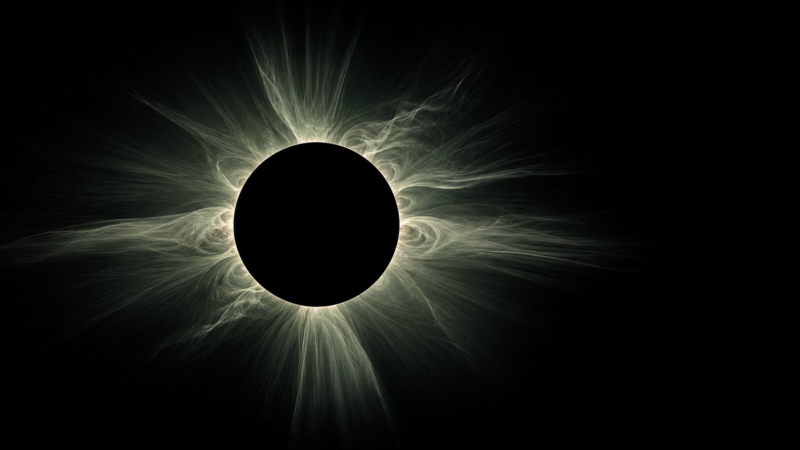
Here is a fascinating Sun-watching idea for SARC members. The European Space Agency’s Proba-3 mission uses two spacecraft to create artificial solar eclipses in orbit. These long eclipses let scientists study a difficult-to-see part of the Sun’s atmosphere where the solar wind develops and space weather begins.

That matters to amateur radio operators. Activity from the Sun can change Earth’s ionosphere, affect high-frequency propagation, interrupt communications, and sometimes create unusual operating conditions.

Topic Snapshot

Item Details
Subject Proba-3 Reveals the Sun’s Inner Corona
Mission European Space Agency Proba-3
Location The Sun
Post idea from Paul Meyers | KE9EJX
Audience SARC members, visitors, new hams, operators, and volunteers
Why it matters Better observations of the solar wind and the origins of space weather
Call to action Learn more about the Sun’s effects on Earth and amateur radio

What Proba-3 Accomplished

Proba-3 consists of two spacecraft called the Occulter and the Coronagraph. During an observing period, they fly approximately 150 meters apart and align with the Sun with millimeter-level precision.

The Occulter carries a disk that blocks the bright solar disk. Its shadow falls across the telescope on the Coronagraph spacecraft. This arrangement makes the two spacecraft operate like one enormous scientific instrument.[3]

The artificial eclipse is created for the instrument in space. It is not an eclipse that people can see from Earth.

By April 2026, ESA reported that Proba-3 had completed 57 artificial solar eclipses and collected more than 250 hours of high-resolution observations. Each observing period can last for approximately five hours.[1]

Why the Inner Corona Is Difficult to See

The corona is the Sun’s outer atmosphere. It is extremely hot, but it is also faint compared with the bright solar disk.

A coronagraph is an instrument that blocks direct sunlight so the surrounding corona can be observed. In a conventional coronagraph, scattered and diffracted light can still hide the portion of the corona closest to the Sun.

A natural total solar eclipse provides a better view because the Moon blocks the solar disk from a great distance. However, totality lasts only a few minutes and can be observed from a limited path on Earth.

Proba-3 moves the blocking disk onto a separate spacecraft. The 150-meter separation reduces unwanted light and allows its ASPIICS coronagraph to see the corona as close as approximately 70,000 kilometers above the Sun’s visible surface.

Earlier space instruments could reliably observe the solar disk and the outer corona, but consistent coverage of the region between them was difficult. Proba-3 is helping fill that observational gap.[4]

How the Artificial Eclipse Works

---
config:
  markdownAutoWrap: true
  flowchart:
    wrappingWidth: 220
    useMaxWidth: true
    nodeSpacing: 40
    rankSpacing: 50
---
flowchart TD
    A["`The Sun produces
intense light`"]

    B["`The Occulter spacecraft
blocks the solar disk`"]

    C["`A controlled shadow crosses
the 150-meter separation`"]

    D["`The Coronagraph spacecraft
images the inner corona`"]

    E["`Researchers track plasma
and solar-wind structures`"]

    F["`Results improve models of
the Sun and space weather`"]

    A --> B
    B --> C
    C --> D
    D --> E
    E --> F

The two spacecraft use cameras, laser measurements, radio links, onboard software, and a shadow-position sensor to maintain their alignment. Small thruster corrections keep the coronagraph’s telescope inside the Occulter’s shadow.

What Proba-3 Found

The headline needs one useful clarification. Proba-3 is not exposing a previously unknown solid surface. It is observing the inner corona, which is part of the Sun’s atmosphere above the visible surface.

The important advance is the mission’s ability to repeatedly observe fine motion in this region for hours instead of minutes.

Reported result Why it is useful
57 artificial eclipses reported by April 2026 Scientists can repeat observations instead of waiting for rare natural eclipses.
More than 250 hours of high-resolution observations Long sequences reveal movement that may be missed in individual images.
One or two images per minute during observations The images can be combined into videos that show movement through the corona.
Observations down to about 70,000 kilometers above the visible surface This reaches a previously difficult observational gap in the inner corona.
Some tracked plasma structures moved at approximately 250–500 kilometers per second These structures were moving roughly three to four times faster than expected in that region.

The first published study tracked small structures moving through streamers and pseudostreamers. Streamers are bright extensions of plasma shaped by the Sun’s magnetic field.

Researchers observed a wide range of speeds, accelerations, and directions. Some structures moved outward while others appeared to move inward. The results show that the region where the slow solar wind forms is more complicated and dynamic than a single smooth stream.[2]

These are early results. They do not settle every question about solar-wind acceleration, coronal heating, or coronal mass ejections. ESA also noted that much of the collected Proba-3 data still needed to be analyzed when the first results were announced.

Why This Matters to Amateur Radio

The solar wind is a continuing flow of charged particles, or plasma, moving outward from the Sun. A coronal mass ejection, usually shortened to CME, is a much larger release of plasma and magnetic field from the corona.

Not every solar event is directed toward Earth. When solar material and its magnetic field do interact with Earth, they can disturb the magnetosphere and ionosphere.

The ionosphere is a group of electrically charged regions high in Earth’s atmosphere. Amateur radio operators use these regions to support long-distance high-frequency communication.

HF means high frequency, generally 3–30 MHz. Changes in ionospheric density and structure can improve a path, weaken it, move the usable frequency range, or block an HF signal. Solar X-rays can quickly increase absorption in the ionosphere’s D region and cause a radio blackout on the sunlit side of Earth.[5]

CMEs and changes in the solar wind can arrive later and produce geomagnetic disturbances. Space-weather forecasters study a CME’s speed, size, direction, and magnetic field to estimate whether it may affect Earth.[6]

Proba-3 is a research mission, not a direct amateur-radio propagation forecast. Its value comes from improving our understanding of how solar-wind structures and eruptions develop close to the Sun.

A Simple Sun-to-Radio Connection

</ tr>

Solar or space-weather condition Possible radio observation Operator response
Increased extreme-ultraviolet activity Changes in ionization and usable HF frequencies Compare several bands and note the time of day.
Strong solar flare Rapid HF absorption or a dayside radio blackout Check NOAA flare and D-region products before changing equipment.
Earth-directed CME Possible geomagnetic disturbance after the material arrives Watch official forecasts and record changing band conditions.
Disturbed geomagnetic field Unstable polar paths, fading, noise, or unusual propagation Try another band, direction, time, or operating mode.

Watch the Proba-3 Video

Astrum explains how Proba-3 creates artificial eclipses and studies the Sun’s inner corona.[8]

How to Participate

  1. Watch the video. Note how the two spacecraft replace the Moon and an Earth-based telescope in the eclipse geometry.
  2. Check official space-weather information. Visit the NOAA Space Weather Prediction Center before an HF operating session.
  3. Record your conditions. Write down the date, local and UTC time, band, mode, signal reports, noise level, and any unusual fading.
  4. Check the F10.7 solar flux. This 2,800 MHz measurement is a useful indicator of solar activity and is widely used in space-weather work.[7]
  5. Compare more than one session. A single good or poor contact does not prove that space weather caused the result.
  6. Share what you learned. Turn your notes into a short SARC presentation, website article, or club discussion.

Suggested SARC Goals

Member type Suggested goal Practical activity
New ham Understand the Sun–ionosphere–radio connection Explain the connection in three simple steps to another member.
HF operator Connect forecasts with real operating conditions Keep a short propagation log for three operating sessions.
Digital-mode operator Compare band conditions objectively Record band, time, decode activity, and official space-weather conditions.
VHF or UHF operator Learn how disturbed conditions can differ from everyday propagation Compare beacon, digital-mode, or weak-signal observations with official reports.
Builder or experimenter Study precision sensing and control Prepare a short explanation of how cameras, lasers, radio links, and thrusters maintain formation.
Presenter or writer Help other members understand space weather Create a five-minute presentation or a short article for the SARC website.

Give It a Try

Watch the Proba-3 video, then check the current space-weather information before your next operating session. See whether the conditions you hear on the air match what the official data suggests.

You do not need to be a solar physicist to take part. A simple log and a few careful observations can help connect solar research with everyday amateur radio.

Visit N9RJV.org for more SARC activities, technical articles, and opportunities to learn with other amateur radio operators.

Suggested WordPress Details

Title Proba-3 Reveals the Sun’s Inner Corona
Category Space Weather
Tags Proba-3, Sun, solar corona, solar wind, space weather, HF propagation, ESA, amateur radio
Excerpt Two spacecraft are creating artificial eclipses so scientists can track motion in the Sun’s inner corona and improve our understanding of space weather.
Suggested Image Image: A 16:9 ESA Proba-3 ASPIICS image showing the inner solar corona during an artificial eclipse.
Alt text: Proba-3 artificial eclipse revealing streamers in the Sun’s inner corona.
Caption: Proba-3 uses two precisely aligned spacecraft to block the bright solar disk and observe the faint inner corona. Credit the image according to the requirements listed by its original source.
Call to Action Watch the Proba-3 video, check official space-weather information, and compare it with conditions during your next amateur-radio operating session.

References

  1. European Space Agency. “First Proba-3 Science: Surprisingly Speedy Solar Wind.” Published April 13, 2026. Accessed August 8, 2026.
    https://www.esa.int/Science_Exploration/Space_Science/First_Proba-3_science_surprisingly_speedy_solar_wind
    ↩
  2. Zhukov, A. N., et al. “Ubiquitous Small-scale Dynamics in the Slow Solar Wind Formation Region Observed by Proba-3/ASPIICS.” The Astrophysical Journal Letters, Volume 999, Number 2, L41. American Astronomical Society, March 2026. Accessed August 8, 2026.
    https://doi.org/10.3847/2041-8213/ae469b
    ↩
  3. European Space Agency. “Proba-3 Achieves Precise Formation Flying.” Published May 8, 2025. Accessed August 8, 2026.
    https://www.esa.int/Enabling_Support/Space_Engineering_Technology/Proba-3_achieves_precise_formation_flying
    ↩
  4. European Space Agency. “Proba-3 Fills the Solar Observation Gap.” Published December 17, 2025. Accessed August 8, 2026.
    https://www.esa.int/Enabling_Support/Space_Engineering_Technology/Proba-3_fills_the_solar_observation_gap
    ↩
  5. NOAA/National Weather Service Space Weather Prediction Center. “HF Radio Communications.” Accessed August 8, 2026.
    https://www.spaceweather.gov/impacts/hf-radio-communications
    ↩
  6. NOAA/National Weather Service Space Weather Prediction Center. “Coronal Mass Ejections.” Accessed August 8, 2026.
    https://www.spaceweather.gov/phenomena/coronal-mass-ejections
    ↩
  7. NOAA/National Weather Service Space Weather Prediction Center. “F10.7 cm Radio Emissions.” Accessed August 8, 2026.
    https://www.spaceweather.gov/phenomena/f107-cm-radio-emissions
    ↩
  8. Astrum. “We’ve Seen the Sun’s Inner Corona for the First Time.” YouTube. Accessed August 8, 2026.
    https://youtu.be/fv5lJjR6DmQ
    ↩

SARC and SATERN at Hoffman Estates National Night Out 2026

Community Service SARC and SATERN

Schaumburg Amateur Radio Club and SATERN volunteers brought amateur radio, portable communications equipment, and plenty of fresh popcorn to the 2026 Hoffman Estates National Night Out.

The community event was held on Tuesday, August 4, from 6:00 to 9:00 p.m. at Fabbrini Park, 1704 Glen Lake Road, Hoffman Estates.[1] Learn more about Hoffman Estates National Night Out.

National Night Out brings residents, police officers, first responders, and community organizations together for an evening focused on safety and neighborhood connections. The national program promotes police-community partnerships and neighborhood camaraderie.[2]

Although the evening was hot and humid, the volunteers stayed busy operating amateur radio, demonstrating portable equipment, and welcoming visitors.

Event Snapshot

Hoffman Estates National Night Out 2026
Item Details
Event Hoffman Estates National Night Out 2026
Date Tuesday, August 4, 2026
Time 6:00–9:00 p.m.
Location Fabbrini Park, 1704 Glen Lake Road, Hoffman Estates, Illinois
Participating Groups Schaumburg Amateur Radio Club and the Salvation Army Team Emergency Radio Network
Activities Portable amateur radio, communications equipment demonstrations, the SARC Tech Net, public outreach, and popcorn
Popcorn Served Approximately 300 large cups during the three-hour event
Event Information Provided by John Thornton, KD9VZJ, Northern Illinois SATERN Coordinator

A Portable Communications Setup

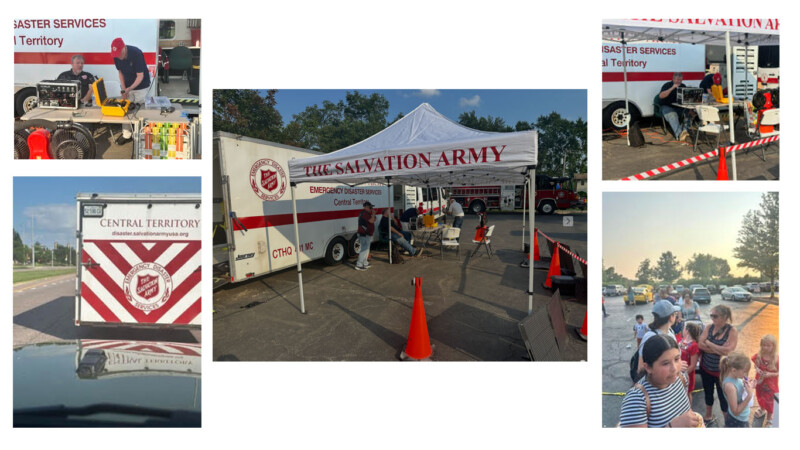
The SATERN Central Territory Communications Trailer arrived behind the Central Territory Sprinter van driven by Don, KD9NJR. John, KD9VZJ, followed in his Jeep 4xe.

SATERN stands for the Salvation Army Team Emergency Radio Network. Its licensed amateur radio volunteers help support emergency and auxiliary communications for The Salvation Army.[3] Learn more about SATERN.

At Fabbrini Park, the team deployed the communications trailer, portable radio equipment, solar panels, EcoFlow power stations, and portable fans. A 10-by-20-foot canopy provided welcome shade for volunteers and visitors.

The setup gave the public a practical look at how amateur radio equipment and portable power can be deployed away from a permanent station.

How the Portable Operation Worked

flowchart TD
A["Transport the trailer and equipment"] --> B["Deploy the canopy, radios, and portable power"]
B --> C["Connect the go-box and communications equipment"]
C --> D["Conduct the SARC Tech Net and demonstrations"]
D --> E["Welcome visitors and serve popcorn"]
E --> F["Shut down, pack equipment, and clean the site"]
A simple overview of the National Night Out portable communications operation.

SARC Tech Net Goes Live From the Park

Don, KD9NJR, conducted the SARC Tech Net live from the National Night Out site. Ken, W9KMP, assisted with the equipment and worked alongside Don at the communications go-box.

A go-box places radios, power connections, and related equipment into a portable package that can be transported and placed into service quickly.

Holding the net from the park demonstrated that club activities do not have to remain inside a home station or meeting room. With suitable radios, antennas, and power sources, amateur radio can operate from many different locations.

The SARC Tuesday Night Tech Net begins at 7:30 p.m. and is open to amateur radio operators who want to ask questions, share information, or discuss technical topics.[4]

Serving the Community—One Cup at a Time

The amateur radio equipment attracted attention, but so did the aroma of hot, fresh popcorn.

John, KD9VZJ; Ken, W9KMP; and Don, KD9NJR, helped serve an estimated 300 large cups of popcorn during the three-hour event. At times, the line of visitors seemed endless.

The popcorn gave volunteers another opportunity to greet local families, answer questions, and introduce people to amateur radio and community service.

Thank You to the Volunteers

Participating volunteers included:

  • Tommy, K9EKE — SARC
  • Don, KD9NJR — SARC and SATERN
  • Ken, W9KMP — SATERN
  • Bill, W9ZCL — SARC and SATERN
  • John, KD9VZJ — Northern Illinois SATERN Coordinator
  • Keith, KD9WDU — SARC

A special thank-you goes to Keith, KD9WDU, who helped with station shutdown and cleanup even though he was not included in the photographs.

Thank you to everyone who transported equipment, operated the station, served popcorn, answered questions, and helped return the site to order at the end of a long evening.

How to Participate in a Future Event

Community events are a good way to see amateur radio in action. They also give operators an opportunity to practice portable station setup, net operations, teamwork, and public outreach.

Members who would like to help at a future event can:

  • Watch the SARC calendar for upcoming club and public-service activities.
  • Volunteer for station setup, operation, public outreach, or cleanup.
  • Ask the event coordinator before bringing personal radios, antennas, batteries, or other equipment.
  • Wear suitable clothing and bring water when an event will be held outdoors.
  • Learn the operating plan, assigned frequencies, and net procedures before going on the air.
  • Help explain amateur radio in simple terms to visitors who may be seeing it for the first time.

Suggested SARC Goals

Ways to build experience through community events
Member Type Suggested Goal Practical First Step
Curious Visitor Learn what amateur radio can do away from a home station. Visit a public event and ask a volunteer to explain the portable station.
Newly Licensed Operator Become more comfortable with nets and portable equipment. Listen to the Tech Net, practice checking in, and assist an experienced operator.
Portable Operator Improve station setup and shutdown procedures. Create a checklist for radios, antennas, feed lines, power, tools, and weather protection.
Public-Service Volunteer Develop stronger communication and teamwork skills. Help with a supervised deployment and learn the event communication plan.
Experienced Member Help newer operators gain practical experience. Mentor a volunteer and explain each part of the station during setup.

Give It a Try

Whether you are an experienced operator, recently licensed, or simply curious about amateur radio, SARC welcomes you.[5]

You do not need to know everything before participating. Community events offer a friendly place to observe, ask questions, help with practical tasks, and learn how a portable station comes together.

Learn more about joining the Schaumburg Amateur Radio Club.

Photographs and event information provided by John Thornton, KD9VZJ, Northern Illinois SATERN Coordinator.

Join SARC and participate in a future portable operating or community-service event

References

  1. “National Night Out Is on the Move for 2026!” Publisher: Village of Hoffman Estates. Accessed August 6, 2026. Full URL: https://www.hoffmanestates.org/news_detail_T3_R203.php ↩
  2. “About National Night Out.” Publisher: National Association of Town Watch. Accessed August 6, 2026. Full URL: https://natw.org/about/ ↩
  3. “SATERN Program.” Publisher: The Salvation Army USA. Accessed August 6, 2026. Full URL: https://www.salvationarmyusa.org/satern-program/ ↩
  4. “Nets.” Publisher: Schaumburg Amateur Radio Club. Accessed August 6, 2026. Full URL: https://www.n9rjv.org/info/nets/ ↩
  5. “Membership.” Publisher: Schaumburg Amateur Radio Club. Accessed August 6, 2026. Full URL: https://www.n9rjv.org/info/membership/ ↩

Digital-Mode WSJT-X 3.0 vs. DECODIUM 4.0 “Shannon”

A Practical Digital-Mode Comparison

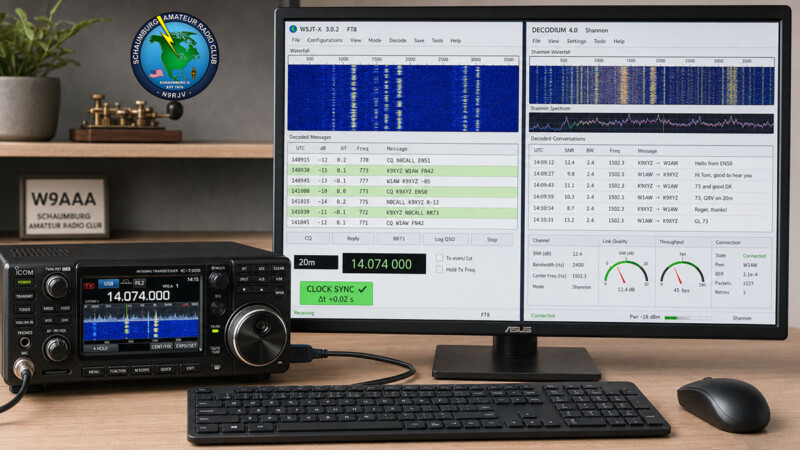
Here is a useful digital-mode experiment for SARC members. WSJT-X 3.0.2 and DECODIUM 4.0 “Shannon” can both place weak-signal activity on your screen, but they approach the operating experience differently.

WSJT-X remains the official reference program for FT8 and many related weak-signal modes. DECODIUM builds on that software lineage while adding FT2, a redesigned interface, integrated station tools, and a rapidly developing C++ architecture.

This is not a declaration that one program is always better. It is a practical comparison intended to help operators choose the right software for their interests and test both programs fairly.

Topic Snapshot

Comparison overview
Item Details
Subject A comparison of WSJT-X 3.0.2 and DECODIUM 4.0 “Shannon”
Post idea from Paul Meyers — KE9EJX
Primary modes FT8, FT4, FT2, Q65, WSPR, and other weak-signal digital modes
WSJT-X version reviewed WSJT-X 3.0.2, the current General Availability release when this article was prepared[1]
DECODIUM release reviewed DECODIUM 4.0 package version 1.0.508; this project changes frequently, so check the official release page before downloading[6]
Audience SARC members, visitors, new hams, digital operators, and technical experimenters
Main question Which program best matches the way you want to operate?
Call to action Choose a digital mode, begin with receive-only testing, and then make a contact

What Is WSJT-X 3.0.2?

WSJT-X is the official weak-signal communication program created and maintained by Joe Taylor, K1JT, and the WSJT Development Team. It supports eleven documented modes: FT8, FT4, Q65, JT65, JT9, JT4, FST4, FST4W, MSK144, WSPR, and Echo.[2]

Version 3.0 added parallel FT8 decoding, message filters, audible alerts, band hopping, improved high-resolution display support, and additional Earth-Moon-Earth operating features. Version 3.0.2 is primarily a bug-fix release. It includes corrections for Ham Radio Deluxe, OmniRig, Transceiver Control Interface, audio handling, installation, and several operating tools.[3]

WSJT-X also works with the QMAP and MAP65 companion programs. These tools are especially useful for wideband Q65 and JT65 reception, moonbounce, and other advanced VHF, UHF, and microwave work.

What Is DECODIUM 4.0 “Shannon”?

DECODIUM 4.0 Core Shannon is an independent weak-signal digital-mode application based on the WSJT-X and DECODIUM development lineage. Its name honors Claude Shannon and the role of information theory in reliable communication through noise.[4]

The program combines a Qt/QML interface with decoding and transmitting components that are being progressively migrated to C++. Its documentation lists FT8, FT4, FT2, Q65, MSK144, JT65, JT9, JT4, FST4, FST4W, and WSPR support. The availability of individual features can vary by operating system, decoder backend, and build.[4]

DECODIUM places many station tools inside one program. These include a live map, DX Cluster, PSK Reporter tools, an ADIF log, persistent decode history, internal Network Time Protocol synchronization, customizable panels, and a local-network web dashboard.[5]

The project is developing quickly. Its documentation notes that some native decoder, modulator, and cross-platform components remain under migration or consolidation. Operators should record the exact build number when reporting a problem or comparing results.

Side-by-Side Comparison

Major differences between WSJT-X 3.0.2 and DECODIUM 4.0
Area WSJT-X 3.0.2 DECODIUM 4.0 “Shannon”
Project role Official WSJT Development Team distribution and reference implementation Independent project built from the WSJT-X and DECODIUM lineage
Release approach General Availability release with point releases that usually concentrate on corrections Fast-moving project with frequent feature, architecture, packaging, and interface updates
FT8 and FT4 Core, well-documented operating modes Supported with a redesigned interface and integrated operating tools
FT2 Not included in the eleven modes listed by the official WSJT-X documentation A central project feature with 3.75-second transmit-and-receive slots and asynchronous decoding
Q65 and EME Strong emphasis on Q65, Echo, QMAP, MAP65, and Earth-Moon-Earth operation Q65 is listed, although the project documentation emphasizes FT2, FT8, and integrated station operation
FT8 decoding Version 3.0 provides optional parallel processing with concurrent threads Uses the project’s Raptor decoding work and progressively migrated C++ paths
Main interface Familiar two-pane operating window with a separate Wide Graph waterfall Customizable Qt/QML workspace with dockable and detachable panels
Maps and cluster tools Can exchange information with companion and third-party programs Provides integrated Live Map, DX Cluster, and PSK Reporter panels
Decode history Maintains operating and decode information in standard program files Provides searchable, persistent SQLite decode history with ADIF export
Time synchronization Requires the station computer to maintain an accurate system clock Adds an internal NTP client and a panel for monitoring time offset and received DT values
Radio control Supports established CAT control methods, including Hamlib, FLRig, HRD, OmniRig, and TCI-related workflows Documents Hamlib, native radio backends, HRD, OmniRig, TCI, and local serial control
External integration Provides UDP networking, logging, reporting, and cooperating-program support Documents WSJT-X-compatible UDP, ADIF TCP, N1MM, PSK Reporter, QRZ Logbook, Cloudlog, and other connections
Remote operation Normally handled through station-control or third-party software Includes an optional local-network web dashboard for a computer, tablet, or phone
Best starting point Operators who want the official release, established documentation, or advanced EME tools Experimenters interested in FT2 or an integrated, customizable digital-station workspace

The Important FT2 Difference

FT2, or Fast Track 2, is a digital mode created within the DECODIUM project. According to its documentation, FT2 uses 3.75-second transmit-and-receive slots. Each transmission lasts approximately 2.52 seconds.[5]

That short cycle can make contacts move much faster than FT8. It also leaves less time for the computer to receive, decode, select a response, and prepare the next transmission.

Clock accuracy, audio configuration, and processor performance therefore become especially important. The DECODIUM manual recommends beginning with FT8, confirming that the station decodes properly, and moving to FT2 only after the basic configuration is working.

FT2 activity may be less common than FT8 activity. Check current project documentation, working-frequency information, applicable FCC rules, and the appropriate amateur band plan before transmitting. Do not assume that an FT8 calling frequency is automatically the correct place for an FT2 experiment.[7][8]

Can One Program Decode More Signals?

That question cannot be answered fairly with one crowded-band screenshot.

The programs offer different decoder settings, filters, hints, timing controls, and display rules. A larger number on the screen does not necessarily mean more valid signals were recovered. Duplicate messages, hinted decodes, filtered messages, and false decodes can change the total.

WSJT-X 3.0 introduced parallel FT8 processing and other performance improvements. DECODIUM uses its Raptor decoding work, C++ components, OpenMP where available, and asynchronous processing for FT2. Those design differences are worth testing, but they do not establish a universal winner for every computer, band condition, and configuration.

A useful comparison should measure valid, unique messages recovered from the same recorded audio.

How to Run a Fair Comparison

1. Record the Test Conditions

Write down the computer, operating system, radio, audio interface, software version, mode, decode depth, and any special decoder options. A comparison without these details is difficult to repeat.

2. Back Up the Station

Back up the existing ADIF log and program settings before installing or changing software. Use the official download source for each program.

3. Begin in Receive-Only Mode

Disable transmitting while confirming the audio input, waterfall, frequency, mode, and clock. This prevents an unexpected transmission while CAT and audio controls are being tested.

4. Do Not Give Both Programs Control at Once

Close one program before allowing the other to control the radio, serial port, audio output, or push-to-talk function. Two programs trying to command the same radio can cause frequency, mode, or transmit-control conflicts.

5. Use the Same Audio

Record several reception periods and decode the same WAV files in both programs. Keep the passband, mode, and comparable decode options as close as possible.

6. Count Valid Unique Messages

Separate unique valid messages from duplicates and questionable decodes. Look for complete callsigns, plausible grids, consistent signal reports, and messages confirmed in later cycles.

7. Compare the Entire Operating Experience

Decoder count is only one measurement. Also compare decode delay, processor load, CAT reliability, logging, screen readability, and how easily you can complete a contact.

Suggested comparison worksheet
Measurement What to Record Why It Matters
Valid unique decodes Confirmed messages recovered from the same audio Provides a more useful result than the total number of displayed lines
Questionable decodes Incomplete, implausible, or unconfirmed callsigns and messages Helps identify false or overly aggressive decoding
Decode latency Time from the end of a received signal to its appearance Especially important with short operating cycles
Processor load Typical and peak CPU use during busy periods Shows whether the computer can keep pace without stalling
Interface responsiveness Waterfall, clicking, scrolling, and panel response A slow interface can interfere with actual operation
CAT and PTT reliability Frequency changes, mode changes, split behavior, and transmit control Reliable station control is essential before transmitting
Logging and reporting ADIF entries, PSK Reporter spots, and external logger transfers Prevents lost or incomplete contact records
Operator preference Readability, workflow, and ease of correcting a mistake The best station software must also work well for its operator

Which Program Should You Try First?

---
config:
  markdownAutoWrap: true
  flowchart:
    wrappingWidth: 220
    useMaxWidth: true
    nodeSpacing: 40
    rankSpacing: 50
---
flowchart TD
    A["`Choose your main
digital-mode goal`"]

    B{"`What interests
you most?`"}

    C["`Begin with
WSJT-X 3.0.2`"]

    D["`Evaluate
DECODIUM 4.0`"]

    E["`Run a controlled
receive test`"]

    A --> B

    B -->|"Official FT modes,<br/>Q65, or EME"| C
    B -->|"FT2 or an<br/>integrated dashboard"| D

    C --> E
    D --> E
A simple starting path for comparing the two programs.

A new digital operator will usually find WSJT-X the clearest reference point because its documentation, operating conventions, and support community are well established.

An operator who already understands FT8 may enjoy evaluating DECODIUM’s integrated tools and flexible workspace. DECODIUM is also the necessary choice for someone who specifically wants to explore FT2.

For advanced Q65, moonbounce, or wideband VHF and UHF work, the official WSJT-X, QMAP, and MAP65 combination deserves careful consideration.

There is no requirement to make a permanent choice. You can keep both programs available, provided that only one controls the radio and audio output at a time.

Suggested SARC Goals

Practical goals for different club members
Member Type Suggested Goal First Step
New digital operator Decode FT8 and complete one properly logged contact Begin with the official WSJT-X tutorial or DECODIUM’s FT8 quick-start procedure
Returning operator Review the newer filtering, alert, and sequencing tools Install the current release and verify saved radio and audio settings
Technical experimenter Compare both FT8 decoders with the same WAV recordings Create a written test sheet before examining the results
FT2 experimenter Receive and study FT2 before transmitting Verify clock accuracy, CPU performance, software version, and current operating information
DX or contest operator Evaluate filters, alerts, queues, and multi-station workflows Test with saved audio before relying on a feature during a busy event
VHF or EME operator Explore Q65, Echo, QMAP, and MAP65 Read the official WSJT-X guide for the intended propagation path
SARC presenter Prepare a repeatable live comparison for a club meeting Bring the same recordings, settings, and measurement worksheet for both programs

Give Digital Modes a Try

WSJT-X 3.0.2 is a strong starting point for operators who want the official weak-signal platform and its established operating tools. DECODIUM 4.0 “Shannon” offers an interesting alternative for operators who want FT2, a customizable workspace, and more station functions in one application.

Start with reception. Confirm the clock, radio control, audio levels, and waterfall. Then make a careful, low-power contact with a clean transmit signal and little or no automatic level control activity.

Most importantly, keep notes and share what you learn. A repeatable comparison from a SARC station is more useful than a claim based on one busy band opening.

Choose a digital mode, listen first, and see what your station can decode.

Begin with receive-only testing, and share your results with SARC

References

  1. “Get WSJT-X,” WSJT Development Team, official WSJT-X website. Accessed July 31, 2026. https://wsjtx.github.io/wsjtx/downloads.html
  2. “WSJT-X Official Home,” Joe Taylor, K1JT, and the WSJT Development Team. Accessed July 31, 2026. https://wsjtx.github.io/wsjtx/index.html
  3. “WSJT-X Release Notes, Release 3.0.2,” WSJT Development Team, June 2026. Accessed July 31, 2026. https://wsjtx.github.io/wsjtx/Release_Notes.txt
  4. “Decodium 4.0 Core Shannon,” IU8LMC and project contributors, GitHub repository and project documentation. Accessed July 31, 2026. https://github.com/iu8lmc/Decodium-4.0-Core-Shannon/
  5. “DECODIUM 4.0 Core Shannon User Manual,” DECODIUM project, FT2.it. Accessed July 31, 2026. https://www.ft2.it/manual/decodium4_manual_en.html
  6. “DECODIUM 4.0 Core Shannon Releases,” DECODIUM project contributors, GitHub. Accessed July 31, 2026. https://github.com/elisir80/Decodium-4.0-Core-Shannon/releases
  7. “47 CFR Part 97—Amateur Radio Service,” Electronic Code of Federal Regulations, Federal Communications Commission. Accessed July 31, 2026. https://www.ecfr.gov/current/title-47/chapter-I/subchapter-D/part-97
  8. “Band Plan,” American Radio Relay League. Accessed July 31, 2026. https://www.arrl.org/band-plan-1

Building a Flexible SDR Ettus USRP B206

SDR Radio with the Ettus USRP B206 mini-i

Compact Power for Wireless Innovation

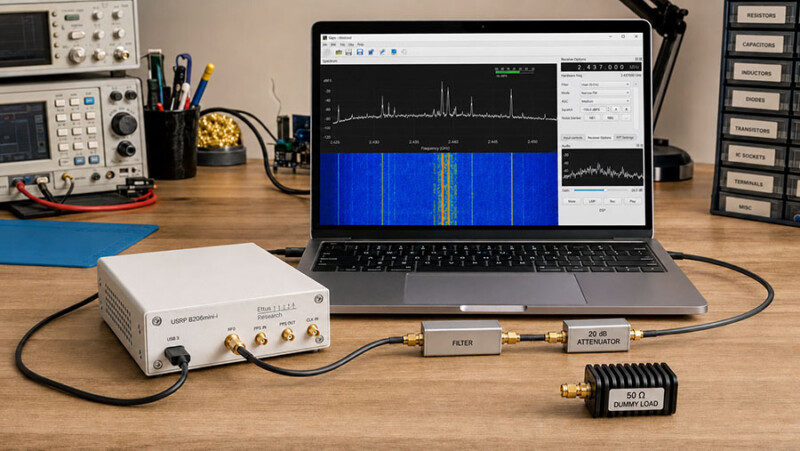
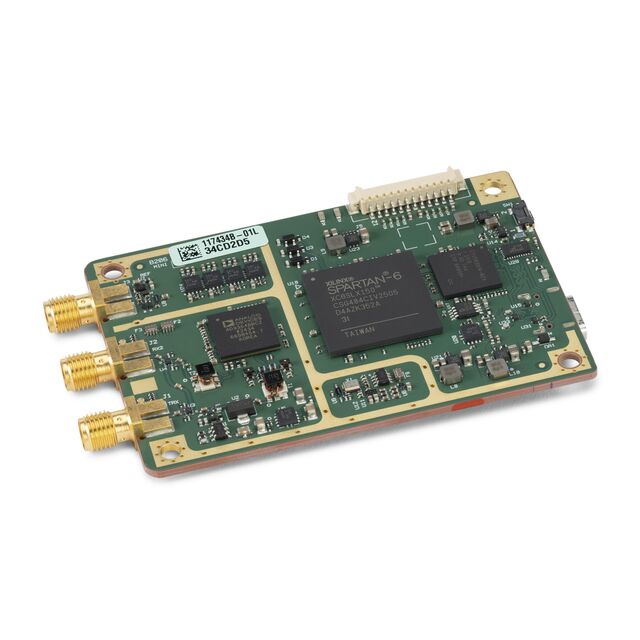
Here is a useful experimentation idea for SARC members: build a flexible software-defined radio bench around the Ettus USRP B206mini-i. Instead of buying a radio designed around one mode, this compact platform lets software define much of the receiver, transmitter, measurement, and signal-processing path.

DigiKey highlights the B206mini-i for wireless communication research, spectrum monitoring, education, and embedded development.[1] For SARC, the interesting question is not simply what the device can receive or transmit. It is what we could learn by building a repeatable experiment around it.

Post idea from Paul Meyers – KE9EJX.

Topic Snapshot

Ettus USRP B206mini-i project at a glance
Item Details
Subject Building a Flexible SDR Radio with the Ettus USRP B206mini-i: Compact Power for Wireless Innovation
Platform Ettus USRP B206mini-i software-defined radio
Radio architecture One transmit path and one receive path with full-duplex capability
Tuning range 70 MHz to 6 GHz
Instantaneous bandwidth Up to 56 MHz
Software USRP Hardware Driver (UHD) 4.9 or later, GNU Radio, C/C++, or Python
Best first project A receive-only spectrum display or narrowband receiver
Audience SARC members, visitors, new hams, the public, operators, and volunteers
Call to action What could you do with a device like this?
Product overview View the DigiKey product highlight

What Makes an SDR Different?

SDR means software-defined radio. The radio still needs real analog hardware for antennas, filtering, gain, frequency conversion, and data conversion. However, many functions that would be fixed in a conventional radio can be changed in software.

A member can change the center frequency, sample rate, receiver gain, filter width, demodulator, decoder, display, recorder, or transmitted waveform without rebuilding the complete radio. That makes an SDR useful for learning because each block in the signal chain can be viewed, adjusted, and measured.

The B206mini-i is a 1×1 platform. In plain language, it has one transmit path and one receive path. Full duplex means those paths can operate at the same time when the software and external RF system are designed correctly. It does not mean that the unit has two independent receive channels.

What the B206mini-i Brings to the Bench

Selected manufacturer specifications for the B206mini-i[2]
Feature Specification Why It Matters
RF coverage 70 MHz to 6 GHz Covers many VHF, UHF, and microwave experiments. It does not directly cover the HF or 6-meter amateur bands.
Instantaneous bandwidth Up to 56 MHz Lets software examine or generate a wide slice of spectrum at one time. It does not view the complete 70 MHz-to-6 GHz range at once.
RF channels 1 TX and 1 RX, independently tunable Supports receive, transmit, and carefully designed full-duplex experiments.
Measured maximum TX output 16.06 dBm from 70 MHz to 4 GHz; 9.16 dBm from 4 GHz to 5.9 GHz Provides a low-level RF source for controlled experiments. Output varies with frequency, and these values are not permission to transmit.
RF and digital hardware Analog Devices AD9364 transceiver and Spartan-6 XC6SLX150 FPGA Combines a flexible RF front end with programmable digital logic.
Data conversion 12-bit ADC and 12-bit DAC; maximum I/Q sample rate of 61.44 MSa/s Provides complex digital samples for software processing. Actual usable rates depend on the complete host and application.
Host connection Bus-powered USB 3 Type-C; 5 V DC at 0.9 A maximum Moves samples and power through one compact host connection.
Timing reference External 10 MHz clock or pulse-per-second (PPS) reference Supports experiments that need improved frequency or time coordination.
Expansion Eight 3.3 V GPIO lines and JTAG Allows hardware control, triggering, FPGA programming, and debugging for advanced work.
Physical versions Board-only or enclosed; enclosed unit is 84.9 mm × 55.7 mm × 19.8 mm and 108 g The manufacturer specifies indoor, noncondensing use. Before operation, the board-only variant must be installed in a suitable shielded enclosure that also meets the stated fire and mechanical end-product enclosure requirements.

The 56 MHz figure is a maximum instantaneous bandwidth, not a requirement. A first project should use only the sample rate and bandwidth it needs. Smaller settings reduce host processing, storage, and USB demands.

How the Signal Path Works On receive, the AD9364 RF

How the Signal Path Works

On receive, the AD9364 RF front end tunes and converts a selected part of the spectrum into in-phase and quadrature samples, usually called I/Q data. Those two sample streams preserve amplitude and phase information. The FPGA manages timing and high-rate digital work. USB carries the samples to the host computer, where UHD connects the hardware to GNU Radio or a custom program.[3]

---
config:
  markdownAutoWrap: true
  flowchart:
    wrappingWidth: 220
    useMaxWidth: true
    nodeSpacing: 40
    rankSpacing: 50
---
flowchart TD
    A["`Antenna or protected
test source`"]

    B["`AD9364 RF
front end`"]

    C["`Spartan-6 FPGA
and I/Q samples`"]

    D["`USB 3 Type-C
connection`"]

    E["`UHD hardware
driver`"]

    F["`GNU Radio, Python,
or C/C++`"]

    G["`Display, decode,
record, or measure`"]

    A --> B
    B --> C
    C --> D
    D --> E
    E --> F
    F --> G
Basic receive path. A transmit experiment follows the path in reverse and requires additional RF protection, testing, and legal checks.

Most new users can begin in GNU Radio Companion, where blocks are connected into a visual flowgraph. FPGA modification is possible, but it is an advanced step. A good first build leaves the supplied FPGA image alone and concentrates on a stable receive path.

Experiment Ideas for SARC

Projects that can grow from simple observation to controlled transmission
Experiment Starting Mode What It Teaches
Waterfall tour Receive only Center frequency, sample rate, gain, noise floor, occupied bandwidth, and visible interference
VHF or UHF FM receiver Receive only Channel filtering, FM demodulation, squelch, audio recovery, and signal-to-noise ratio
Antenna or filter comparison Receive only How signal level, noise, overload, and selectivity change when one RF component is changed
Digital signal recorder and decoder Receive only I/Q recording, sampling, digital demodulation, clock recovery, and repeatable offline analysis
Frequency-reference comparison Receive only Use an external 10 MHz reference to study oscillator drift and frequency accuracy, or PPS to study timestamp and time alignment.
Attenuated loopback Shielded bench test Waveform generation, occupied bandwidth, filtering, attenuation, and receiver dynamic range
Low-power amateur digital experiment Licensed and measured transmit setup Modulation, identification, minimum necessary bandwidth, spurious-output control, and link testing

What You Need

  • An enclosed Ettus USRP B206mini-i, or a board-only variant installed in a suitable shielded enclosure that also meets the manufacturer’s fire and mechanical end-product enclosure requirements
  • The correct USB 3 Type-C data cable and a host computer with a suitable USB connection
  • A current supported UHD release; the manufacturer specifies UHD 4.9 or later
  • GNU Radio for visual flowgraphs, or C/C++ or Python for custom applications
  • A band-appropriate antenna, 50-ohm coax, and the correct SMA adapters for receive-only work
  • Filters, attenuators, or a preamplifier selected for the specific experiment
  • For transmit testing: a suitable 50-ohm dummy load, verified attenuation, output filtering, and a way to examine the transmitted spectrum
  • A notebook or shared project log for frequency, sample rate, bandwidth, gain, antenna, filter, software version, and results

Check the current NI, Ettus, and DigiKey pages before ordering. Availability, package contents, software support, and pricing may change.

A Practical First Setup

  1. Choose one receive question. For example, decide to display a known local signal, compare two antennas, or measure how a filter changes the noise floor.
  2. Connect the receive path. Use the RX2 connector, a suitable antenna or protected test source, and any needed receive filter or attenuation. Do not connect another transmitter directly to the input.
  3. Install UHD and verify the hardware. Ettus documents uhd_find_devices for discovery and uhd_usrp_probe for reporting device properties.[4]
 uhd_find_devices
 uhd_usrp_probe
  1. Build the smallest useful flowgraph. In GNU Radio Companion, begin with a UHD: USRP Source and a frequency or waterfall display. A hardware USRP Source supplies the timing, so a Throttle block is not needed in that path.[5]
  2. Start modestly. Select a narrow sample rate, begin with low receive gain, tune a known signal, and increase gain only as needed. Watch for overload and dropped-sample warnings.
  3. Change one setting at a time. Record the center frequency, sample rate, analog bandwidth, gain, antenna, and observed result before making the next change.
  4. Save the working baseline. Keep the flowgraph and notes together so another SARC member can reproduce the demonstration.

Protect the Radio and the Test Bench

The B206mini-i is sensitive laboratory hardware. Ettus says to terminate the transmit port in a suitable antenna or 50-ohm load, never apply more than −15 dBm to an RF input, and use at least 30 dB of attenuation for loopback operation.[6] Never connect the transmit port directly to RX2.

Use shielded I/O cables no longer than 3 m (10 ft), protect the hardware from electrostatic discharge, and keep it away from water and condensation. Power it only from a suitably rated and certified USB source with a Class 2, Limited Energy, or LPC output. Before operation, the board-only variant must be installed in a suitable shielded enclosure that also meets the stated fire and mechanical end-product enclosure requirements.[7]

NI describes the product as intended for indoor use. The enclosed version has a wider specified operating-temperature range, but that does not make it weatherproof.[7]

Before Any On-Air Transmission

A tuning range is a hardware capability, not permission to transmit. NI also states that the product itself is not approved or licensed for over-the-air antenna transmission and tells users to determine compliance with local law.[7] Treat the B206mini-i as experimental RF hardware, not as a finished plug-and-play amateur transceiver.

For a United States amateur-radio experiment, begin with receive-only work. Then move to a dummy load or shielded path, measure the output, add the correct filtering, verify power and RF exposure, and only then consider an antenna. Current Part 97 rules permit brief test emissions for experimental purposes only on frequencies authorized to the control operator and subject to the applicable emission limits.[8]

Before transmitting, the licensed control operator must confirm the authorized band segment and emission, keep the occupied bandwidth no wider than necessary, control spurious output and interference, use the minimum power needed, identify the station correctly, and determine whether the station qualifies for an RF-exposure exemption or requires an evaluation.[9][10][11][12]

Suggested SARC Goals

Simple SDR goals for different participants
Participant Suggested Goal
Visitor or member of the public Follow one signal from the antenna to the waterfall and identify the purpose of center frequency, sample rate, and gain.
New ham Build a receive-only display, tune two signals in covered amateur bands, and record the settings that worked.
Active operator Create a reusable VHF or UHF receive chain and compare two antennas or filters while holding other settings constant.
Programmer Use UHD with Python or another supported language to capture timestamped signal-level or spectrum measurements.
Builder Assemble a protected RF input path with a filter, attenuator, labeled cables, and a written maximum-level check.
Advanced experimenter Generate a waveform into an attenuated bench setup and verify its occupied bandwidth and unwanted emissions before considering antenna use.
SARC project team Build a receive-only demonstration kit with a tested flowgraph, a short operating card, and transmit disabled by default.

Give It a Try

The B206mini-i brings RF hardware, digital signal processing, software, measurement, and programming together on one small bench. A newcomer can begin with a waterfall. An experienced builder can work on filtering, timing, automation, or a controlled waveform. Both are doing useful amateur-radio experimentation.

Start with one question. Build the smallest receive-only flowgraph that can answer it. Keep good notes. Then share the setup and the result with another SARC member.

What could you do with a device like this?

Choose one receive-only experiment, document it, and share what you learn with SARC.

Explore how the compact Ettus USRP B206mini-i can support receive-only SDR projects, GNU Radio experiments, controlled RF testing, and wireless communication research for SARC members.

References

  1. “Ettus USRP B206mini-i Compact Power for Wireless Innovation.” DigiKey. September 29, 2025. Accessed July 30, 2026. Full URL: https://www.digikey.com/en/product-highlight/n/national-instruments/ettus-usrp-b206mini-i-compact-power. ↩
  2. “USRP B206mini-i Specifications.” National Instruments and Ettus Research. Revision 379222A-01, September 2025. Accessed July 30, 2026. Full URL: https://www.ettus.com/wp-content/uploads/2025/09/usrp_b206mini-i_specifications.pdf. ↩
  3. “USRP B206mini-i.” Ettus Research, a National Instruments Brand. Accessed July 30, 2026. Full URL: https://www.ettus.com/all-products/usrp-b206mini-i/. ↩
  4. “Device Identification.” USRP Hardware Driver and USRP Manual. Ettus Research. Accessed July 30, 2026. Full URL: https://files.ettus.com/manual/page_identification.html. ↩
  5. “USRP Source.” GNU Radio Wiki, GNU Radio Project. Last modified September 26, 2023. Accessed July 30, 2026. Full URL: https://wiki.gnuradio.org/index.php/USRP_Source. ↩
  6. “USRP B2x0 Series.” USRP Hardware Driver and USRP Manual. Ettus Research. UHD manual version 4.10.0.0 displayed at access. Accessed July 30, 2026. Full URL: https://files.ettus.com/manual/page_usrp_b200.html. ↩
  7. “USRP B206mini-i Safety, Environmental, and Regulatory Information.” National Instruments. Document 327928A-01, September 1, 2025. Accessed July 30, 2026. Full URL: https://docs-be.ni.com/bundle/usrp-b206mini-i-seri/raw/resource/enus/usrp-b206mini-i-seri.pdf. Return to citations: a, b, c.
  8. “47 CFR § 97.305: Authorized Emission Types.” Electronic Code of Federal Regulations. Accessed July 30, 2026. Full URL: https://www.ecfr.gov/current/title-47/chapter-I/subchapter-D/part-97/subpart-D/section-97.305. ↩
  9. “47 CFR § 97.307: Emission Standards” and “47 CFR § 97.313: Transmitter Power Standards.” Electronic Code of Federal Regulations. Accessed July 30, 2026. Full URLs: https://www.ecfr.gov/current/title-47/chapter-I/subchapter-D/part-97/subpart-D/section-97.307 and https://www.ecfr.gov/current/title-47/chapter-I/subchapter-D/part-97/subpart-D/section-97.313. ↩
  10. “47 CFR § 97.119: Station Identification.” Electronic Code of Federal Regulations. Accessed July 30, 2026. Full URL: https://www.ecfr.gov/current/title-47/chapter-I/subchapter-D/part-97/subpart-B/section-97.119. ↩
  11. “47 CFR § 97.13: Restrictions on Station Location.” Electronic Code of Federal Regulations. Accessed July 30, 2026. Full URL: https://www.ecfr.gov/current/title-47/chapter-I/subchapter-D/part-97/subpart-A/section-97.13. ↩
  12. “47 CFR §§ 1.1307 and 1.1310: Radiofrequency Exposure Evaluation and Limits.” Electronic Code of Federal Regulations. Accessed July 30, 2026. Full URLs: https://www.ecfr.gov/current/title-47/chapter-I/subchapter-A/part-1/subpart-I/section-1.1307 and https://www.ecfr.gov/current/title-47/chapter-I/subchapter-A/part-1/subpart-I/section-1.1310. ↩