Portable Measurement Baselines and Fast Field Troubleshooting
When you are out in the field, every minute and every tool counts. From quick checks of matching networks to sweeping coax for common-mode current, a compact kit and a tight process can turn frustrating guesswork into fast, confident decisions.
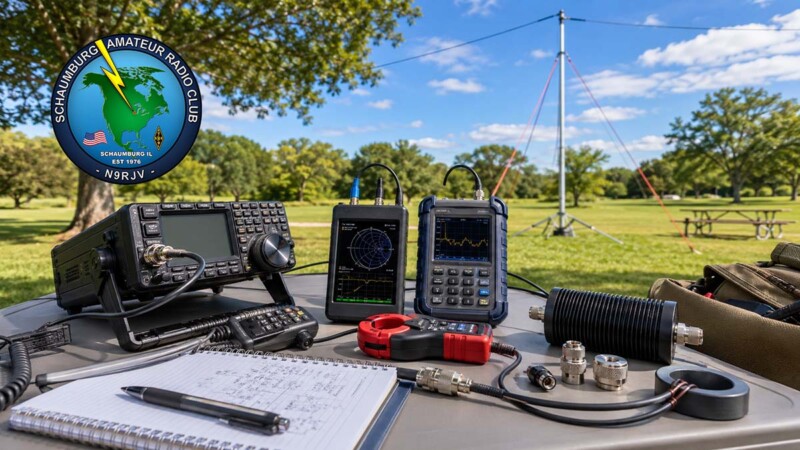
This guide is designed for park activations, club demonstrations, antenna days, emergency exercises, and portable HF/VHF testing. The goal is simple: establish a repeatable baseline, identify obvious losses or common-mode problems, make a quick correction, and log the final result.
Field Measurement Benefits
Measure at the Feedpoint
Start where the antenna system begins. A feedpoint reading helps separate antenna problems from feedline or station-side issues.
Check Common-Mode Fast
A snap-on RF current clamp lets you inspect the coax shield without cutting, soldering, or rebuilding the feedline in the field.
Fix, Retest, Log
Install a choke, tighten a connector, retest the baseline, and record the final readings before operating or demonstrating.
Practical Devices: Budget to Pro
The best analyzer is the one you know how to calibrate, read, and trust under field conditions. These options cover budget, mid-price, and more traditional analyzer workflows.
Device Selection Table
| Tool | Best field use | Typical strength | Field note |
|---|---|---|---|
| SeeSii NanoVNA-F V2 / Mustool NanoVNA-F V2 / NanoVNA-F V2 | Budget VNA work, antenna checks, S-parameter checks, Smith chart review | Small size, flexible measurements, low cost | Calibrate for the frequency span and measurement plane before trusting the reading.[1][2] |
| RigExpert Stick 230 | HF through VHF quick antenna and cable checks | 0.1 to 230 MHz handheld workflow | Good for demonstrations where simple SWR, return loss, R, X, Z, L, C, magnitude, and phase readings are enough.[3] |
| RigExpert Stick Pro | HF/VHF/UHF portable checks | 0.1 to 600 MHz coverage | Use when the deployment needs more range than the Stick 230 and a handheld interface.[4] |
| RigExpert Stick XPro | Wider-range analyzer checks and cable tools | 0.1 to 1000 MHz coverage with TDR and cable-tool modes | Useful when UHF work, distance-to-fault checks, or broader analyzer functions matter.[5] |
| RigExpert AA-55 | Classic HF antenna and cable testing | 60 kHz to 55 MHz, familiar analyzer workflow | Good for HF events where a larger handheld instrument is acceptable.[6] |
| MFJ-269CPRO | Legacy HF/VHF/UHF analyzer workflow | Antenna, feedline, tuner, filter, trap, choke, and inductor checks | Good where club members already know the MFJ menu, knobs, and meter behavior.[7] |
| Tekbox TBCP2 or Com-Power CLCE-series RF current probe | Common-mode current checks on coax and cable bundles | Snap-on inspection without cutting the line | Slide the probe along the cable to find current hot spots and retest after choking.[8][9][10] |
Clamp Probe Pick: Find the Feed-line Acting Like an Antenna
Snap-on RF current clamps, such as Tekbox/TBCP2 or Com-Power CLCE-series probes, let you sweep coax runs and look for common-mode current without soldering onto the feedline. For low-cost experimenting, an ARRL-style DIY clamp can also be built and used as a practical field indicator.[8][9][10][11]
Minimal Park/Test Kit Essentials
Keep the kit small enough to carry, but complete enough to isolate common portable antenna problems quickly.
- Analyzer, VNA, or handheld
- RF current clamp
- 50 Ω dummy load
- Short N/SMA jumpers
- Anderson Powerpole leads
- Small chokes / FT-240-43 cores
- Good multimeter
- CoaxSeal and heat-shrink
The 8-Minute In-Field Script
Use this script when time is tight, daylight is fading, or the group needs a repeatable troubleshooting routine.
Baseline Log Table
| Step | Reading to capture | Decision trigger | Final log entry |
|---|---|---|---|
| Feedpoint calibration and SWR | Frequency, SWR, R, X, and measurement plane | Mismatch appears at the antenna before the feedline is added | Feedpoint baseline |
| Rig-side SWR check | Same frequency and antenna state from the station end | Rig-side reading differs meaningfully from feedpoint reading | Feedline or station-side note |
| Clamp sweep for common-mode peaks | Probe location, band, relative current peak, and null location | Shield current hot spot moves or remains high after a routing change | Common-mode note and coax position |
| Install and test chokes/connectors | Choke type, connector change, and before/after reading | Reading improves, worsens, or stays unchanged after one correction | Correction result |
| Final read and log | Final SWR, impedance note, power level, coax length, and band | Ready to operate, demonstrate, or schedule follow-up work | Final baseline |
Portable Measurement Troubleshooting Flow Diagram
---
config:
  markdownAutoWrap: true
  flowchart:
    wrappingWidth: 220
    useMaxWidth: true
    nodeSpacing: 40
    rankSpacing: 50
---
flowchart TD
    A["`0:30
Power and visual safety check`"]

    B["`1:30
Feedpoint calibration and SWR`"]

    C["`1:00
Rig-side SWR check`"]

    D{"`Do the feedpoint and rig-side
readings agree?`"}

    E["`1:30
Clamp sweep for
common-mode peaks`"]

    F["`Inspect feedline, adapters,
and station-side connections`"]

    G{"`Was a common-mode
peak found?`"}

    H["`2:00
Install and test
chokes and connectors`"]

    I["`1:30
Final reading
and log entry`"]

    A --> B
    B --> C
    C --> D

    D -->|"Yes"| E
    D -->|"No"| F

    F --> C
    E --> G

    G -->|"Yes"| H
    G -->|"No"| I

    H --> I
Troubleshooting Time Allocation Graph
xychart-beta
    title "8-Minute Script Time Allocation"
    x-axis ["Safety", "Feedpoint", "Rig-side", "Clamp", "Correct", "Log"]
    y-axis "Minutes" 0 --> 2
    bar [0.5, 1.5, 1.0, 1.5, 2.0, 1.5]
Field Measurement FAQ
Should I buy a NanoVNA or a dedicated antenna analyzer?
A NanoVNA gives more measurement flexibility for a low price, but it requires careful calibration and practice. A dedicated analyzer is usually faster and simpler for quick SWR and impedance checks in the field.
Why measure at both the feedpoint and rig side?
Feedpoint readings show the antenna condition more directly. Rig-side readings include the feedline and station connections, so comparing both helps identify where the problem begins.
What does an RF current clamp show?
It helps detect current flowing on the outside of the coax shield. That current can indicate common-mode behavior, unwanted feedline radiation, noise pickup, or a need for better choking.
What should I log after testing?
Log the band, frequency, antenna, coax length, feedpoint reading, rig-side reading, choke location, power level, and final result. This makes the next deployment much faster.
Bottom Line
A compact measurement kit and a repeatable routine help you move from “is this working?” to useful corrective action. That matters during demonstrations, activations, troubleshooting sessions, and any portable deployment where time and confidence matter.
References
- “SeeSii NanoVNA-F V2 4.3″ Vector Network Analyzer 50kHz–3GHz.” Publisher: SeeSii. Accessed July 9, 2026. URL: https://www.seesiius.com/products/seesii-nanovna-f-v2-4-3-vector-network-analyzer-50khz-3000mhz
- “User Manual | NanoVNA V2 | NanoRFE.” Publisher: NanoRFE. Accessed July 9, 2026. URL: https://nanorfe.com/nanovna-v2-user-manual.html
- “Stick 230.” Publisher: RigExpert. Accessed July 9, 2026. URL: https://rigexpert.com/antenna-analyzers/stick-230/
- “Stick Pro.” Publisher: RigExpert. Accessed July 9, 2026. URL: https://rigexpert.com/antenna-analyzers/stick-pro/
- “Stick XPro.” Publisher: RigExpert. Accessed July 9, 2026. URL: https://rigexpert.com/antenna-analyzers/stick-xpro/
- “AA-55 ZOOM.” Publisher: RigExpert. Accessed July 9, 2026. URL: https://rigexpert.com/discontinued-products/aa-55-zoom/
- “MFJ-269Pro Instruction Manual: Antenna Analyzer.” Publisher: MFJ Enterprises; hosted by Repeater Builder. Accessed July 9, 2026. URL: https://manuals.repeater-builder.com/MFJ/MFJ-269PRO/MFJ-269PRO.pdf
- “TBCP2 32mm Snap On RF Current Monitoring Probes.” Publisher: Tekbox Digital Solutions. Accessed July 9, 2026. URL: https://www.tekbox.com/product/tbcp2-32mm-snap-on-rf-current-monitoring-probes/
- “Selecting the Right RF Current Monitoring Probe: Com-Power CLCE Series Product Guide.” Publisher: Com-Power Corporation. Accessed July 9, 2026. URL: https://www.com-power.com/tech-notes/selecting-the-right-rf-current-monitoring-probe–com-power-clce-series-product-guide
- “Using the RF Current Probe.” Publisher: Com-Power Corporation. Accessed July 9, 2026. URL: https://www.com-power.com/uploads/technote/UsingtheCurrentProbe.pdf
- “Common-Mode Current and Common-Mode Chokes.” Publisher: ARRL/QST. Accessed July 9, 2026. URL: https://www.arrl.org/files/file/QST/This%20Month%20in%20QST/2024/03%20Mar%2024/03%20march%202024%20Lamano%20free%20article.pdf